How to Collect Voice Recordings Online From Many People, With Just a Link
Browser recording works for 96.72% of web users, so you can collect voice recordings online from a link. Consent wording, formats, storage and file naming.
The short version
- Browsers can record audio without an app: Can I Use puts MediaRecorder support at 96.72% of global web usage, with iPhones covered from Safari 14.5.
- Recording only works on HTTPS pages and only after the person grants microphone access. If they refuse, the browser returns a NotAllowedError, so plan a clear recovery message.
- A voice is personal data under both India's DPDP Act 2023 and the GDPR. Consent must be specific and as easy to withdraw as to give, and fines reach ₹250 crore or €20 million.
- Decide file names and folders before the first recording arrives: one folder per project, one row per respondent, and IDs instead of names in the file path.
You do not need an app to collect voice recordings online from hundreds of people. A web page can record audio in the browser, and 96.72% of global web traffic runs a browser that supports it. To collect voice recordings online, you send a link, people tap a microphone, and the files land in one place. The hard parts are consent, formats and storage, and that is what this post covers.
No app, no account, no email attachments. Just a link. Most guides on this topic stop at "use a recorder app and ask people to upload the file". That works for 5 people. It falls apart at 50, because every extra step costs you respondents, and every emailed file costs you an hour of renaming.
To collect voice recordings online from many people, build a web form with a voice answer field, add a consent question, and share the link or a QR code. People record in their phone browser after allowing the microphone. Recordings arrive next to each person's other answers, ready to export to a spreadsheet with audio links.
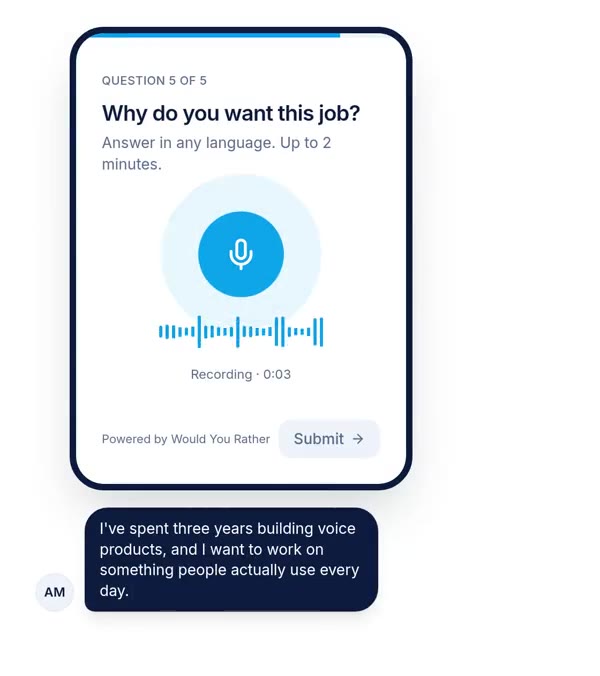
Why a link beats an app for collecting recordings
Every method of gathering audio from a group asks people to do something. The question is how many steps sit between "I'll help" and a file in your folder. A link removes the two steps where most people give up: installing something and sending a file back.
Here is how the common methods compare. Each one wins somewhere, and the link is not always the right answer.
| Method | What each person must do | What you get back | Where it wins |
|---|---|---|---|
| Web form with a voice field | Open a link, allow the mic, record, submit | Every recording in one table, linked to the person's other answers | Groups of 20 to thousands, structured projects |
| WhatsApp or messaging voice notes | Record a note and send it to you | Files scattered across chats, no structured fields | Very small groups who already message you; nothing to build |
| Recorder app plus file upload | Install or find an app, record, find the file, upload it | Mixed formats, higher drop-off, often a sign-in step | Studio-quality audio from a few motivated people |
| Phone call or IVR line | Call a number and speak | Call recordings, needs telephony | People without smartphones or mobile data |
The messaging row deserves a fair hearing. If you need 6 voice notes from colleagues by Friday, WhatsApp is faster than building anything. We would not use it for anything larger. You lose the link between each recording and who sent it, what they consented to, and which question they were answering.
The upload route has its own trap. On Google Forms, the file upload question requires every respondent to sign in to a Google account. We cover that and the other workarounds in whether Google Forms can record audio.
What the link approach does not change
A link removes friction, not reluctance. Some people will still prefer to type, and some will be somewhere they cannot speak. Our earlier post on voice surveys and spoken answers walks through the research on answer length and drop-off, so we will not repeat it here. The short version: offer a typed fallback unless the recording itself is the deliverable.
What respondents see: the microphone permission flow
Browser recording rests on two web APIs. getUserMedia() asks for the microphone and returns a live audio stream. MediaRecorder turns that stream into a file. Two rules from the MDN documentation for getUserMedia shape everything your respondents experience.
First, it only works in a secure context. On a page that is not served over HTTPS, the microphone API is simply undefined. Second, the browser must always ask the user's permission before opening a microphone, at least the first time on each site. You cannot skip or pre-approve that prompt, and you should not want to.
- 1The person opens your HTTPS linkOn a phone this usually means the default browser. Links opened inside some social apps load in an in-app browser, which may not allow recording.
- 2They read the question and the consent noticePut the consent question before the first recording, so nobody records before agreeing to what happens next.
- 3They tap the microphone and the browser asks for accessThis is the browser's own prompt, not yours. Your page can only explain beforehand why it is coming.
- 4They allow it, record, and play the answer backLet people listen and re-record. A second take costs you nothing and removes the anxiety of a single shot.
- 5They submit, and the file uploadsThe recording is sent with the rest of the form. Uploading straight to storage avoids size limits on your own server.
When someone refuses or ignores the prompt
If the person taps Block, the browser rejects the request with a NotAllowedError. MDN also notes something easy to miss: the request can neither succeed nor fail, because the user may simply ignore the prompt. Your page needs a message for both cases.
A good recovery message says what happened and what to tap. "Permission denied" is the browser's phrasing, not a human one. In our own recorder, a blocked microphone shows: "Microphone access is blocked. Allow the microphone for this site in your browser settings (tap the lock or "aA" icon next to the address), then tap Try again." We think every recorder should name the exact icon, because most people have never opened site settings.
Embedding a recorder inside another page
If you embed the form in an iframe on your own site, the host page must grant microphone access to that frame through Permissions Policy, for example allow="microphone" on the iframe. Without it, MDN says the user will never even be asked. This is the most common reason an embedded recorder silently fails while the direct link works.
Consent wording that holds up under DPDP and GDPR
Consent is not a checkbox you add at the end. It is the part of the form that decides what you are allowed to do with every file you collect. Write it before you write the questions.
India's Digital Personal Data Protection Act 2023 sets the bar in section 6. Consent must be free, specific, informed, unconditional and unambiguous, with a clear affirmative action. Section 5 adds a notice: what data you collect and why, how the person can withdraw, and how they can complain to the Data Protection Board. The person must be able to read it in English or any language in the Eighth Schedule of the Constitution.
The GDPR covers the same ground with different words. Article 7(3) says withdrawing consent must be as easy as giving it. The DPDP Act uses almost the same idea: withdrawal should be comparable in ease to how consent was given.
| Requirement | India, DPDP Act 2023 | EU, GDPR |
|---|---|---|
| What counts as personal data | Any data about an individual identifiable by or in relation to it (s. 2(t)) | Any information relating to an identified or identifiable person (Art. 4(1)) |
| Standard for consent | Free, specific, informed, unconditional, unambiguous, clear affirmative action (s. 6(1)) | Freely given, specific, informed, unambiguous; explicit for special categories |
| Withdrawal | Comparable in ease to giving consent (s. 6(4)) | As easy as giving consent (Art. 7(3)) |
| Language of the notice | English or any Eighth Schedule language, on request (s. 5(3)) | Clear and plain language |
| Maximum penalty | Up to ₹250 crore for security failures (Schedule) | Up to €20 million or 4% of turnover (Art. 83(5)) |
Consent wording you can adapt
Here is a template that covers both laws' basics for an ordinary research or feedback project. Adapt it with someone who knows your situation, because this is a starting point and not legal advice.
We will record your voice answers to the questions in this form. We use them to [purpose, e.g. understand how customers use our service]. Only [who, e.g. our research team of 4 people] will listen to them. We keep recordings until [date or event] and then delete them. You can withdraw consent and ask us to delete your recordings at any time by emailing [contact]. You can also complain to [the Data Protection Board of India / your data protection authority].
Make the consent question required, and make the person tick it themselves. A pre-ticked box fails the "clear affirmative action" test in the DPDP Act and the GDPR's unambiguous standard.
Separate the purposes
If you might use a recording for two things, ask twice. "Use my answer for research" and "quote my voice publicly" are different purposes. The DPDP Act's own example in section 6 limits consent to what is necessary for the stated purpose. We would rather lose a few public quotes than bury a second purpose inside the first.
Voice recordings are personal data: storage and privacy
A voice recording attached to a name or email is personal data under both laws. That much is not controversial. The harder question is whether it is something more.
Under the GDPR, biometric data means data from specific technical processing that allows or confirms the unique identification of a person. Article 9 bans processing biometric data "for the purpose of uniquely identifying" someone unless an exception applies, such as explicit consent. Recital 51 says photographs count as biometric only when processed by specific technical means for identification. Our reading is that the same logic applies to voice: an ordinary feedback recording is personal data, and voiceprint matching makes it biometric. Check that reading with counsel if speaker identification is anywhere in your plans.
What the DPDP Act asks you to do with the files
Section 8 of the DPDP Act puts three duties on whoever decides why the data is collected. You must take reasonable security safeguards against a breach. You must tell the Board and each affected person if a breach happens. And you must erase the data once consent is withdrawn or the purpose is served, unless another law requires you to keep it.
The penalties are ceilings that "may extend to" the figure, decided case by case. The Rules that put most of these duties into practice were notified in November 2025 and phase in over the following 18 months, according to law-firm summaries we read. Check the current notification before you rely on any date.
A storage checklist for voice files
Four practical rules cover most of the risk for a small team:
- Keep recordings private by default. Nobody should be able to open a file by guessing its URL. Serve them through short-lived signed links or behind a login.
- Limit who can listen. Give viewers read access only. Remove people from the project when they leave it.
- Set a deletion date when you collect, not later. Write it in the consent text, then put it in a calendar.
- Keep the consent answer with the recording. If someone withdraws, you need to find every file of theirs in minutes.
Our own product follows the first rule: voice answers sit in private storage and open through signed links that expire, and collaborators get editor or viewer roles per form.
Audio file formats: what the browser actually records
People are often surprised that they cannot choose "MP3" in a browser recorder. MediaRecorder records into whatever container and codec the browser can encode. Your code asks for a format and the browser says yes or no.
The MDN reference for isTypeSupported() explains the pattern. You pass a MIME type such as audio/webm;codecs=opus and get back true or false. A true answer means the browser can record that format, though recording may still fail if the device lacks resources. Recorders therefore try a short list in order of preference and take the first match.
Our own recorder tries audio/webm;codecs=opus, then audio/webm, audio/mp4 and audio/ogg;codecs=opus. The practical result for anyone collecting from a large group: expect more than one file format in the same project. That is normal, and you should plan for it rather than fight it.
Why Opus is a good default for speech
The MDN audio codec guide describes Opus as a general-purpose codec that handles speech and music efficiently. It supports bit rates from 6 to 510 kbps and runs from narrowband at 8 kHz up to fullband at 48 kHz. For spoken answers that is more range than you need, and the files stay small.
MDN's voice example mentions two speech codecs as well. AMR encodes 200 to 3,400 Hz at around 7.4 kbps, and G.722 encodes 50 to 7,000 Hz at around 64 kbps. At those rates, a minute of audio comes to about 55 KB and 480 KB respectively, by our arithmetic. Browser recordings will sit somewhere in that region, which is why 1,000 two-minute answers rarely add up to more than a few gigabytes.
When to convert
Convert only when a downstream tool demands it. Check what your transcription service accepts before converting anything. A speech dataset may need 16 kHz mono WAV, which is a one-line conversion with a tool like ffmpeg. Keep the original files either way. If you are building training data, our guide on building a speech dataset for ASR covers formats and sample rates in more detail.
Naming and organising hundreds of recordings
The organising problem starts the day the first 50 files arrive. Fix it before then. Our position is simple: never organise audio by people's names, and never organise it in a folder you browse by hand.
Use IDs in file paths. A path like project / response ID / question ID stays stable when someone corrects the spelling of their name, and it leaks nothing if a path appears in a log. Our product stores voice answers this way: one folder per form, one per response, one file per question.
Put the spreadsheet in charge
The file system is a bad index. A spreadsheet with one row per person and one column per question, holding an audio link in each cell, is a good one. You can filter by consent, sort by date and add a "reviewed" column without touching a single file. Our guide to sending form responses to Google Sheets shows how live sync with audio links works.
Add these columns from day one:
- Consent version. If you change the wording halfway through, you need to know who agreed to which text.
- Language. For multilingual projects, record what language the person chose. See collecting answers in Hindi, Tamil or any language.
- Review status. Not reviewed, usable, unusable, and a reason.
- Deletion date. Taken from your consent text, so withdrawal and expiry are a filter away.
When a link is the wrong tool
Browser recording covers most people, but not everyone. The 96.72% figure is a share of web usage, not of people. Someone on an old phone, or without mobile data, is invisible to that statistic and to your link. For those groups, a phone line or an in-person recorder is the honest choice.
Audio quality is the second limit. A phone browser records whatever the phone's microphone hears, in whatever room the person is in. If you need studio-grade audio for voice-over or broadcast, a link will disappoint you. For research, feedback and most speech data, it is good enough, and the scale makes up for the noise.
In-app browsers are the third. Links opened inside some social and messaging apps can load in a browser view that blocks or limits the microphone. Tell people to open the link in Chrome or Safari if recording fails. Our recorder says exactly that when it detects an unsupported browser.
Finally, this post is not legal advice. We have summarised the DPDP Act and GDPR from their official texts, but the DPDP Rules are still phasing in, and how a regulator reads "biometric" for voice is not settled. If you collect sensitive topics, children's voices or anything for identification, talk to a lawyer first.
How to run your first collection this week
Start smaller than you think. Pick one question that needs a spoken answer, write the consent text, and send the link to 20 people. Look at what comes back before you scale.
Here is the order we would follow. Write the consent notice first, then the voice question, with a clear time limit. Add a typed fallback unless the audio itself is the point. Share by link, or by QR code for events and field work, which we cover in QR code forms for events. Then check the first 20 recordings: are they audible, in the right language, and linked to a consent answer?
If all three hold, you are ready for the next 2,000. If you also plan to turn recordings into public quotes, read our guide to voice testimonials without video first, because public use needs its own consent.
References
- Can I Use, MediaRecorder API, accessed 8 October 2026. Used for the 96.72% global support figure and iOS Safari 14.5.
- MDN Web Docs, MediaDevices: getUserMedia(), accessed 8 October 2026. Used for the HTTPS requirement, permission prompt, NotAllowedError and iframe Permissions Policy.
- MDN Web Docs, MediaRecorder: isTypeSupported(), accessed 8 October 2026. Used for how browsers report supported recording formats.
- MDN Web Docs, Web audio codec guide, accessed 8 October 2026. Used for Opus bit rates and sample rates, and the AMR and G.722 figures.
- Government of India, The Digital Personal Data Protection Act, 2023, Gazette of India, 11 August 2023. Used for the definition of personal data, notice, consent, withdrawal, security, erasure and the penalty Schedule.
- European Union, Regulation (EU) 2016/679 (GDPR), EUR-Lex. Used for Articles 4(1), 4(14), 7(3), 9 and 83(5), and recital 51.
The weakest point in this source base: none of these sources says directly whether an ordinary voice recording is biometric data, so that paragraph is our reading of the GDPR text, and the DPDP Rules timeline comes from secondary summaries rather than the Gazette notification.
Questions people ask
How can I collect voice recordings from multiple people online?
Build a web form with a voice answer field and share its link or QR code. Each person opens it in their phone or laptop browser, allows the microphone, records, and submits. You receive every recording next to their other answers, such as name or consent. No app install is needed, because modern browsers record audio through the built-in MediaRecorder API on HTTPS pages.
Can someone send me a voice recording without an app?
Yes. A web page can record audio directly in the browser, so the sender only needs a link. Chrome, Firefox, Edge and Safari on iPhone (from version 14.5) all support browser recording. The page must be served over HTTPS, and the sender must allow microphone access when the browser asks. The recording uploads when they press submit.
Is a voice recording personal data?
Usually, yes. India's DPDP Act defines personal data as any data about an individual who is identifiable by or in relation to that data, and a voice plus a name or email clearly qualifies. The GDPR uses a similar test. If you process voice to uniquely identify someone, the GDPR treats it as biometric data, which needs explicit consent or another Article 9 exception.
What should a voice recording consent form say?
State what you are recording, why, who will hear it, how long you keep it, and how the person can withdraw consent or ask for deletion. Name a contact person. Under India's DPDP Act the notice must also explain how to complain to the Data Protection Board, and the person can ask to read it in English or any Eighth Schedule language. Use a tick box they must actively select.
What audio format does browser recording produce?
It depends on the browser. The MediaRecorder API records into whatever container and codec the browser supports, commonly WebM with the Opus codec, and in some browsers MP4. Developers check support with MediaRecorder.isTypeSupported() and fall back down a list. Expect a mix of formats from a large group, and convert to WAV or MP3 afterwards only if your downstream tool needs it.
How do I organise hundreds of audio recordings?
Keep one row per respondent in a spreadsheet, with a column per question holding the audio link. Store files under project, response ID and question ID rather than people's names, so you can rename or delete a person without breaking paths. Add columns for consent version, date and review status. Sort and filter in the sheet, not in the file system.
Drafted with AI from published research, then edited and approved by Shivam Singh.
Would you rather hear the answer?
Make a voice form in a minute. It’s free.
Create a form