AI Form Generator: Describe the Form Out Loud, Get a Draft, Then Fix the Wording
An AI form generator drafts fields in seconds, but wording still decides answers: one clause cut support from 68% to 43% in a Pew poll. 10 prompts to copy.
The short version
- An AI form generator turns a plain description into a draft form with field types already picked. Describing it out loud is fast: speech entry ran about 3 times faster than a phone keyboard in a 2016 Stanford-led study (153 vs 52 words per minute).
- The draft is the easy part. Wording decides answers: in a 2003 Pew poll, support for military action fell from 68% to 43% once the question mentioned thousands of casualties.
- AI drafts tend to get structure and field types right and need checking for leading words, double-barrelled questions, agree-disagree scales, option lists and required flags, the problems Pew and AAPOR guidance warns about.
- Write prompts that name the audience, the goal, each question and its answer type. The 10 prompts in this post are a starting point you can paste and adapt.
An AI form generator can turn one spoken sentence into a working draft in seconds. That part is solved. The part that still decides your results is the wording. The evidence on wording is brutal: in one 2003 Pew Research Center poll, adding a short clause about casualties moved support for military action from 68% to 43%.
Describe the form out loud, get a draft with the right field types, then spend the time you saved on the questions themselves. That is the whole method. This post shows how AI form generators work, gives you 10 prompts to copy, and lists what you must still check before you send anything.
To generate a form with AI, describe who will answer, what you need to learn, each question in order and the answer type for each. The generator returns a draft with field types picked. Then check every question for leading words, double questions and missing answer options, set required flags deliberately, and preview it on a phone before sharing.
How an AI form generator works
Under the hood, every AI form generator does the same job. A large language model reads your description and returns a structured list: a title, then questions, each with a type, a label, options and settings. The form builder turns that list into real fields you can edit.
The good ones constrain the model. Instead of letting it write free text, they force its output into a fixed schema of field types the builder actually supports. That is why a decent generator never hands you a question type the product cannot render.
What Would You Rather does with your description
We read our own code before writing this section, so here is exactly what happens. You can start a new form with "Generate with AI" on the dashboard, or add questions to an open form with the same button in the builder. The model returns fields from 11 types: name, short text, long text, email, number, phone, date, single choice, multiple choice, rating and voice response.
It uses a voice response field whenever your description says the respondent should speak, spell or record something. If you paste exact sentences or a list of clips, the instructions tell the model to copy each one verbatim, one question per line, without translating or fixing spelling. That matters for speech-data forms in scripts like Malayalam or Odia.
It does not do everything. The generator does not create section breaks, file uploads or photo and video uploads, and it does not write branching logic. You add those in the builder afterwards. It also does not attach recorded audio to questions; that is a separate step we cover in how to add audio questions to a form.
Speaking the description is faster than typing it
Most people describe a form better out loud than in a text box. Speech is quick, and it carries the context a terse typed prompt leaves out. A Stanford and University of Washington study measured text entry on a smartphone. Speech entry in English ran at 153 words per minute against 52 for the keyboard, 2.93 times faster. That was a lab task with short set phrases, so treat it as direction, not a promise.
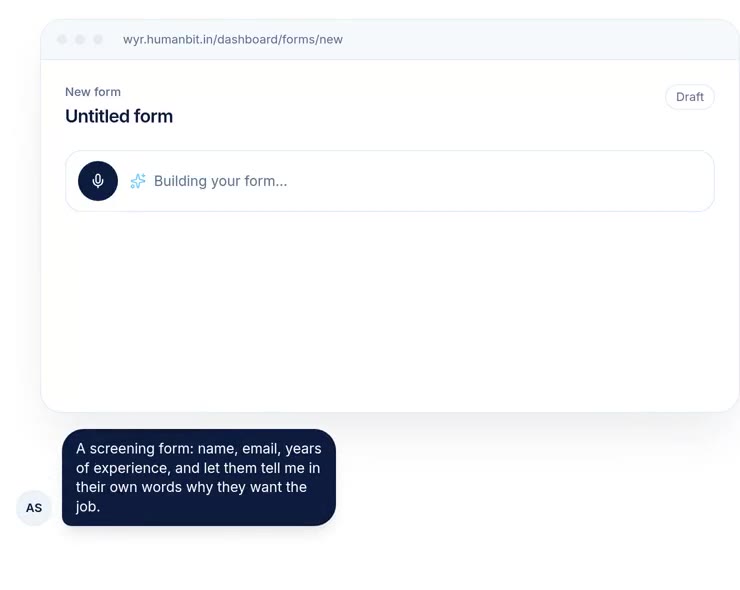
A straight note on our product: the builder's prompt box takes text. To describe a form out loud, use the dictation built into your phone keyboard or laptop, and the words land in the box. The homepage demo shows the idea with a microphone button, and the generation behind it is the same.
10 prompts you can copy
Each prompt below names the audience, the goal, the questions in order, and the answer types. That structure matters more than clever phrasing. Paste one, change the details, and read the draft against the checklist later in this post.
| Use case | Prompt to paste |
|---|---|
| Job screening | "Screening form for a customer support role. Name, email, phone, and years of support experience as a number. Preferred shift as single choice from Morning, Evening or Night. Then a voice answer of up to 90 seconds on a time they calmed down an angry customer." |
| Event feedback | "Feedback form for a one-day workshop. Overall rating 1 to 5. Sessions attended as multiple choice from Keynote, Panel and Hands-on lab. Then an optional long text on one thing we should change." |
| Customer churn | "Exit survey for customers who cancelled. Main reason as single choice from Price, Missing feature, Switched to competitor, No longer needed and Other. Then an optional voice answer asking what would have made them stay." |
| Product research | "Short survey for current users. How often they use the product, as single choice from Daily, Weekly, Monthly and Rarely. Then a voice answer about the last time the product saved them time." |
| Field visit report | "Site visit form for field staff. Name, date of visit, village name as short text, number of households met, then a voice answer describing what they saw at the site today." |
| Speech data collection | "Name first. Then one voice answer per sentence below, minimum 6 seconds each, in Hindi. Keep each sentence exactly as written. [paste sentences]" |
| Course check-in | "Weekly check-in for students. Name, then how confident they feel about this week's topic on a 1 to 5 scale. Then a voice answer explaining one idea they found hard, in their own words." |
| Volunteer sign-up | "Volunteer sign-up for a weekend drive. Name, phone and email. Which days they can come, as multiple choice from Saturday and Sunday. Whether they can bring a vehicle, as Yes or No." |
| NPS with follow-up | "How likely are you to recommend us on a 0 to 10 scale, then an optional voice answer asking for the main reason behind their score." |
| Testimonial request | "Testimonial form for happy customers. Name, company and role. Then a voice answer of up to 60 seconds on the problem they had before using us, and what changed." |
The prompts are ours, written for this post, and they are starting points rather than tested templates. Several ask for a voice answer, because one spoken question often gets more reasons than a text box. We explain when that pays off, and when it costs you respondents, in our guide to voice surveys. The NPS prompt pairs well with our advice on the NPS follow-up question.
What an AI draft usually gets right
Language models are good at the mechanical half of form design. Given a clear prompt, a draft will typically put questions in the order you asked. It will pick an email field for an email and a rating for a rating. It will write plausible option lists for common topics.
That is real time saved. The blank page is where many forms stall, and a draft you can react to is easier to improve than nothing. We think this is the honest value of an AI form generator: it moves you from writing to editing in under a minute.
The trap is that fluent output looks finished. A well-formatted question with tidy options reads as correct even when it is not. Survey researchers have spent decades documenting how small wording choices change answers. None of that research stops applying because a model wrote the question.
What an AI draft gets wrong, and what to check
Treat the draft as a first pass from a fast junior colleague who has never run a survey. The five checks below come from published questionnaire design guidance, mainly Pew Research Center's guide to writing survey questions and AAPOR's best practices.
Leading and one-sided wording
AAPOR's best practices tell researchers to keep questions free of bias by avoiding language that pushes respondents to answer a certain way, or that presents only one side of an issue. Models often add friendly framing: "How much did you enjoy our new onboarding?" assumes enjoyment. Rewrite it as "How would you rate the new onboarding?" with a balanced scale.
Small additions matter more than they look. Pew's own example is stark. Support for military action in Iraq was 68% without a mention of casualties and 43% when the question mentioned thousands of them. Word choice alone moves results too.
- Version A
- Version B
Two questions in one
"How satisfied are you with our pricing and support?" is two questions. A respondent who loves the support and hates the price has no honest answer. Pew calls these double-barrelled questions and recommends splitting them. Models produce them often when your prompt lists several topics in one breath, so scan every label for "and".
Agree-disagree scales
Generators love statements like "The checkout was easy. Agree or disagree?" Pew notes that respondents tend to agree with agree-disagree statements, and that less educated and less informed respondents do so more often. Pew's better practice is a forced choice between alternatives. Ask "Was the checkout easy or hard?" instead of asking people to agree that it was easy.
Option lists that steer or miss answers
A closed list tells people what counts as an answer. In a 2008 Pew experiment, 58% chose the economy when it was on a list, while 35% named it when asked open-ended. And 43% of people asked the open version gave an answer that was not on the list at all. A model's tidy five-option list can quietly do the same to your data.
Three fixes help. Add an "Other" option when the list cannot be complete. Keep lists short; Pew suggests four or five options for most questions. And when you do not yet know the likely answers, ask the question open, ideally as a voice answer, and build the list later from what people actually said.
Field types and required flags
The model guesses which questions are required, and it may mark everything required. Every required question is a point where someone can quit. We would make only the questions you cannot analyse without required, and leave reflective questions optional. Check field types too. A phone number in a short text field loses validation, and a 1 to 10 rating written as single choice is clumsy on a phone.
If your form needs branching, add it yourself and test each path. Our guide to conditional logic in forms covers how to set it up without trapping respondents.
A review checklist before you publish
The checks above fit into one pass. Here is the order we would follow, from the quick wins to the one most people skip.
- 1Read every label aloudListen for assumptions, flattering words and 'and'. If a question sounds like it wants a particular answer, rewrite it neutrally.
- 2Replace agree-disagree statementsTurn each one into a direct choice between alternatives, such as easy or hard, worth it or not worth it.
- 3Check every option listIs it short, balanced and complete? Add 'Other' where the list cannot cover everything.
- 4Set field types and required flags on purposeUse the most specific field type for each answer. Require only what you cannot do without.
- 5Order questions from easy to hardNames and quick taps first, open and spoken questions later. AAPOR guidance also puts general questions before specific ones on the same topic.
- 6Pretest with three to five real peopleWatch them answer on a phone. Pew calls pretesting an essential step, and it catches what no checklist does.
How AI form generators compare
Most major form tools now offer some kind of AI drafting. We checked each one's own help pages in October 2026. The table covers drafting only, not AI analysis of responses.
| Tool | What you give it | What it drafts | Where it is the better choice |
|---|---|---|---|
| Would You Rather | A typed or dictated description, optionally a CSV of questions and a reference image | Questions with field types, including voice answers; no sections or logic | Forms where some answers should be spoken, and speech-data forms with exact sentences |
| Typeform AI | A written or spoken prompt | A full form, and it can also refine settings and add branching and logic | When you want AI to handle logic and settings as well as questions |
| Google Forms with Gemini | A prompt or Drive files such as Docs, Sheets and PDFs | A new form or quiz with answer keys and points; no multiple sections yet | Teachers and Workspace users turning existing documents into quizzes |
| Jotform AI | A description of the form | A form built from the description | Teams already using Jotform's large template and widget library |
Two concessions belong in plain sight. Typeform's help centre says its AI can add branching and logic, which ours cannot do today. Google's Gemini form creation can start from an existing document and mark quiz answers, which is the faster route for teachers with material already in Drive. Google's version needs an eligible Workspace or Google AI plan and runs on desktop only, according to that page. For a fuller side-by-side, see Would You Rather vs Typeform and Would You Rather vs Google Forms.
On data: Typeform's AI FAQ says its form creation uses OpenAI. Would You Rather's generator also calls an OpenAI model, and it sends only your description, plus any CSV or reference image you attach, not your respondents' answers.
Where AI form generation falls short
Four limits are worth stating plainly, including some about this post.
First, the wording research we cite is mostly about public opinion polls in the United States. The mechanisms, framing and acquiescence, are well established, but the size of the effect on a customer survey or a hiring form will differ. Second, we have not run a controlled test of how often any AI generator, ours included, writes leading or double-barrelled questions. The checks above come from methodology guidance, not from a measured error rate.
Third, the speed figure for speech comes from a lab study of short set phrases. Describing a form out loud involves thinking, pausing and correcting, so the real gain is smaller. Fourth, AI features change monthly. The comparison table is accurate for October 2026 and will age quickly.
The strongest counter-argument is that a generator makes it too easy to skip thinking about the question at all. We take that seriously. A form you did not have to think about is a form whose results you may not be able to interpret. The checklist is our answer, and it only works if you use it.
Your first AI draft, in 10 minutes
Pick the form you have been putting off. Say what it is for in two or three sentences, out loud, into your phone's dictation. Name each question and how people should answer it. Paste that into the generator and let it draft.
Then run the six-step checklist, send the form to three colleagues, and watch one of them answer it on a phone. Fix what confuses them. If an open question matters most, try it as a voice answer and see whether the replies get longer. For hiring forms, our list of voice screening questions gives you tested wording to start from.
References
- Pew Research Center, Writing Survey Questions, accessed 8 October 2026. Used for the wording, open vs closed and acquiescence examples, option counts and pretesting guidance.
- American Association for Public Opinion Research, Best Practices for Survey Research, accessed 8 October 2026. Used for guidance on biased and one-sided wording, acquiescence and pretesting.
- Ruan, S., Wobbrock, J. O., Liou, K., Ng, A. and Landay, J. A., Speech Is 3x Faster than Typing for English and Mandarin Text Entry on Mobile Devices, arXiv, 2016. Used for speech vs keyboard entry speed.
- Typeform Help Center, Create your form using AI, and AI with Typeform FAQ, accessed 8 October 2026. Used for Typeform AI capabilities and model provider.
- Google Docs Editors Help, Create a form with Gemini in Google Forms, accessed 8 October 2026. Used for Gemini form creation features, plan requirement and limits.
- Jotform, Jotform AI page, accessed 8 October 2026. Used for the existence of prompt-based form creation in Jotform.
- Would You Rather source code: the AI generation server code, form schema and builder dialog, read 8 October 2026. Used for how our generator works and its limits.
The weakest point in this source base: the wording evidence comes from US political polls. No source here measures how often AI generators produce flawed questions, so the checklist is guidance rather than a measured fix.
Questions people ask
What is an AI form generator?
An AI form generator is a tool that turns a written or spoken description into a draft form. You describe who the form is for and what you need to learn, and a large language model returns a title and a list of questions with field types such as email, rating, multiple choice or voice answer. You then edit the draft like any other form. It saves the blank-page step, not the review step.
Can AI create a Google Form?
Yes, with an eligible plan. Google's help centre describes a Gemini feature called Help me create a form, which builds a new form from a prompt or from Drive files such as Docs, Sheets and PDFs. As of October 2026, Google says it does not yet support forms with multiple sections, cannot edit an existing form, and is available on desktop only. It requires an eligible Google Workspace or Google AI plan.
How do I write a good prompt for an AI form builder?
Name four things: who will answer, what decision the answers feed, each question you want in order, and the answer type for each. For example, ask for a 1 to 5 rating rather than a vague satisfaction question. Say which questions are required and which are optional. If you paste exact question wording, say it must be kept verbatim. Short, specific prompts beat long, vague ones.
Are AI-generated survey questions biased?
They can be, in the same ways human-written questions are. Language models write fluent questions, and fluency can hide leading words, one-sided framing or two questions in one. Pew Research Center and AAPOR both warn that wording, answer options and question order change results. Read every generated question as if a critic wrote it, and pretest the form with a few real respondents before sending it widely.
Can an AI form builder add conditional logic?
Some can. Typeform's help centre says its Typeform AI can refine a form, change settings and add branching and logic. Would You Rather's generator drafts the questions and field types only, and you add section-level branching in the builder afterwards. Whichever tool you use, test every branch by hand, because a logic rule that sends people to the wrong section fails silently.
Is it free to generate a form with AI?
It depends on the tool. Google's Gemini form creation needs an eligible Google Workspace or Google AI plan. Typeform and Jotform both offer AI form creation, and their plan terms are on their own pricing pages. Would You Rather is free to start and includes the AI draft in the builder. Check each tool's current pricing page before you commit, because AI features move between plans often.
Drafted with AI from published research, then edited and approved by Shivam Singh.
Would you rather hear the answer?
Make a voice form in a minute. It’s free.
Create a form