Would You Rather vs Typeform: Voice Answers vs Polished Text Forms
Typeform's free plan takes 10 responses a month and its audio answers start on a US$119 plan. When to pick Typeform, and when a voice-first form fits better.
The short version
- Pick Typeform for polish, templates, payments and its 500+ Zapier integrations. Its Payment question needs a Basic plan or higher, per Typeform's help centre, October 2026.
- Typeform can record audio answers, but only on Growth and Talent plans. Talent starts at US$119 a month and each recording is capped at 2 minutes, a limit Typeform says cannot be changed.
- Typeform's free plan collects 10 responses a month across all your forms, according to its help centre. Paid plans start at US$28 a month billed yearly for 100 responses.
- Pick Would You Rather when the spoken answer is the point: voice on the free start, a time limit you set, any spoken language, and QR forms that can skip sign-in.
Typeform asks one question at a time. So does Would You Rather. The difference is what happens next: on Typeform, the respondent usually types, and on Would You Rather, the respondent usually talks. Typeform can record audio too, but only on plans that start at US$119 a month, so the Typeform vs Would You Rather choice comes down to whether the spoken answer is the point of your form.
Same one-question layout. Different default answer. Below is the verdict first, then the evidence: what each tool costs as of October 2026, where Typeform plainly wins, and where a voice-first form earns its place.
Pick Typeform if you need polished text forms with templates, payments, quizzes and hundreds of integrations. Pick Would You Rather if you want people to answer by speaking, in any language, from a phone browser or a QR code. Typeform records audio only on Growth and Talent plans, with a fixed 2-minute cap.
The verdict, before the detail
Most comparison posts bury the answer. Here it is in two lists. If your form fits the first list, close this tab and use Typeform. It is a mature product and we would not try to talk you out of it.
Pick Typeform when the form is a product surface
Typeform is the better choice when the form itself is part of your brand or your funnel. Think lead capture on a marketing site, a paid booking, a quiz that scores people, or an order form. Typeform has a Payment question that connects to Stripe, knowledge and outcome quizzes, scores and calculations, and a pricing page that lists 500+ integrations through Zapier. Would You Rather has none of the payment or quiz features, and its integrations are a Google Sheets sync and an API.
Pick Typeform, too, if most of your questions have short, typed answers and you care about design polish more than depth. A five-question lead form does not need a microphone.
Pick Would You Rather when the answer has to be heard
Would You Rather is the better choice when you want reasons, stories or speech, not values. Hiring screens, customer interviews at scale, field research and speech-data collection all fall here. Voice is a standard field on the free start, not a feature behind a higher plan. You set the recording length, and respondents speak in whatever language they think in.
It also fits walk-up situations. A per-form setting lets anyone with the link or QR code answer without signing in, which matters at events, in shops and in the field. We think that combination, voice plus no sign-in plus a phone browser, is the whole case for a voice-first tool.
Typeform can record audio too, on higher plans
This part surprises people, so it deserves its own section. Typeform does support spoken answers. The feature is called Video and Audio, and it lives inside the main Typeform builder. VideoAsk, Typeform's separate video product, is a different tool with its own pricing, which we cover in our voice-first vs video-first comparison.
What Typeform's video and audio answers do
According to Typeform's help centre article on video and audio answers, you add a Video and Audio block and the respondent can answer by video, audio or text. Video is on by default. Audio and text are toggles you switch on. Respondents can also upload a pre-recorded video of up to 500 MB.
In Responses, Typeform shows an auto-generated transcript next to each answer and lets you search it. Closed captions are available, though the article notes they currently work only in English. That transcript is a real advantage. Would You Rather does not transcribe answers today, so on that point Typeform simply does more.
Where the limits sit
The limits are the reason a voice-first tool still has a job to do. Typeform says video and audio answers are available on all Growth and Talent plans, and that each answer can be up to 2 minutes long, a limit that cannot be adjusted. Two minutes is plenty for most screening questions. It is too short for a reading task, an oral exam or a long customer story.
The plan gate matters more than the cap. On the pricing page, the Talent plan starts at US$119 a month and Growth Flow costs US$266 a month billed yearly. Basic, Plus and Business list video answers as not available, while Growth Flow includes 20,000 a month. If you want one voice question in an otherwise ordinary form, that is a large step up in price.
Would You Rather vs Typeform, side by side
Here is the comparison on the things buyers actually ask about. Typeform facts come from its pricing page and help centre as of October 2026. Would You Rather facts come from the product itself.
| Would You Rather | Typeform | |
|---|---|---|
| Layout | One question at a time, phone browser, no app | One question at a time, phone browser, no app |
| Voice answers | Standard field; you set min and max seconds (120 s default) | Growth and Talent plans only; fixed 2-minute cap |
| Text option beside voice | Optional per question, off by default | Optional toggle; video is the default |
| Transcripts of voice answers | Not offered | Auto-generated transcript in Responses |
| Question read aloud by the creator | Record the question in your own voice | Record a video question (paid feature) |
| Answer without signing in | Per-form setting, built for QR codes | Yes, forms are public by default |
| Branching logic | Section-level show, skip and jump | Logic, branching, scores and calculations, including on Free |
| Payments | Not offered | Stripe Payment question on Basic and up |
| Integrations | Google Sheets sync with audio links, CSV, API | 500+ via Zapier, plus native Sheets, HubSpot, Slack and more |
| Templates and design polish | Logo, colours and fonts per form | Templates, premium themes, brand kits; Typeform wins here |
| Free tier | Free to start | 10 responses a month across all forms |
Two rows deserve a straight reading. Typeform wins on integrations, payments, transcripts and design depth, and the gap is not small. Would You Rather wins on getting a spoken answer out of someone cheaply and quickly, from a link or a printed QR code.
What Typeform costs in October 2026
Typeform's pricing page shows six tiers. The chart below uses the prices it lists with yearly billing, which it labels as a 30% saving. Talent is the HR plan, listed separately as starting at US$119 a month.
The free plan is a trial in practice
Typeform's free plan collects 10 responses a month in total across all your forms. That is enough to build and test, not to run a real survey. To its credit, the free plan includes logic, integrations, exports and Typeform AI, so you can judge the product properly before paying.
The same article lists what is paid-only. File upload, the Payment question, video questions, video answers, multi-language forms and removing Typeform branding all need a paid plan. Plan for that before you design a form around any of them.
Response limits shape the real price
Basic includes 100 responses a month, with a maximum monthly limit of 750. Plus includes 1,000, and Business includes 10,000. If your form goes out to a list of 2,000 people, you are on Plus at minimum. We think response caps, not the headline price, are what decide the bill for most teams.
Where Would You Rather is the better fit
A voice-first tool is not a better Typeform. It is a narrower tool that does one job with less friction. Here is where that job shows up.
Spoken answers are the default, not an add-on
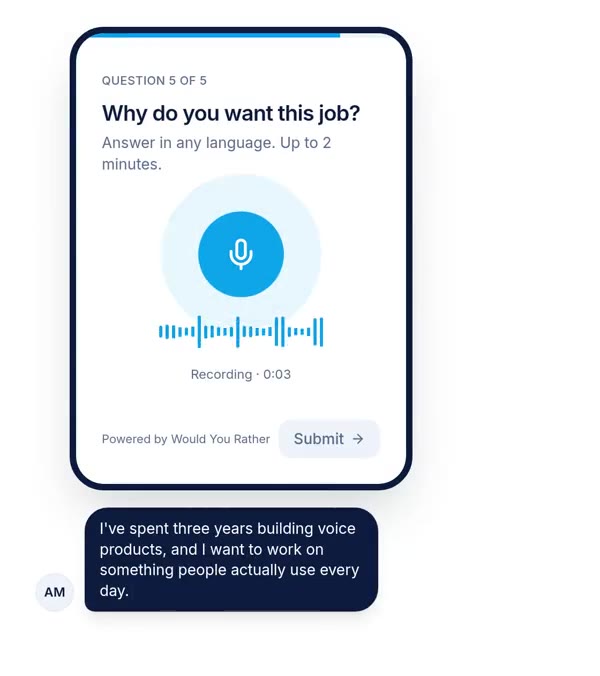
In Would You Rather, the voice answer is one of 14 field types, alongside name, email, rating, choices, file upload and photo or video upload. You drop it into any form, set a minimum and maximum length, and publish. There is no separate product and no higher tier to pay for.
Why bother with voice at all? Research on smartphone surveys points one way. A 2024 randomised experiment with 1,001 smartphone respondents found voice answers contained more words and covered more topics than typed ones. The same study also found voice loses more respondents, which is why we break down the trade-off in our analysis of voice surveys and drop-off.
Any language the respondent speaks
Typeform's multi-language forms let you serve one form in several languages, and its help centre lists them as a paid feature. That solves a different problem. When you ask someone to speak, they answer in the language they think in, whatever language the question was written in. You write the question in Hindi, Tamil or English, and the recording captures what they actually said.
For script-reading and speech-data forms, Would You Rather also has a transcript mode with on-screen transliteration suggestions for Indian languages. We cover multilingual setups in collecting answers in Hindi, Tamil or any language.
QR codes without sign-in
By default, Would You Rather asks respondents to sign in, which lets you stop duplicate submissions and capture who answered. Switch on "Answer without signing in" for a form and anyone with the link or QR code can answer straight away. That trade-off is explicit, and you choose it per form. See our guide to QR code forms for events for how to print and place them.
Hearing the creator's voice too
Voice runs both ways. A creator can record the question in their own voice, so respondents hear a person rather than read a prompt. Typeform offers video questions on paid plans, which do a similar job with a camera. We would rather record a 20-second audio prompt than set up lighting for a video one, but that is a preference, not a fact.
Running a voice question in Would You Rather
Setting up a voice question takes a few minutes. The process below is how it works in the builder today.
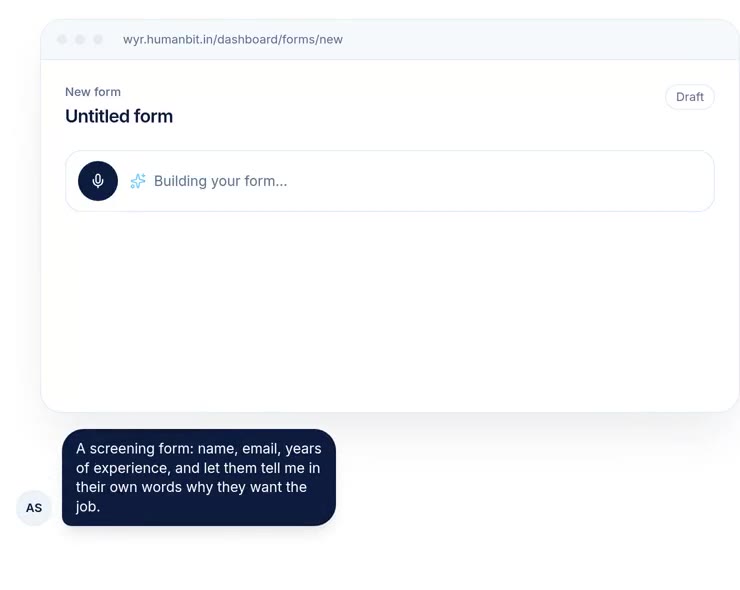
- 1Describe the form, by typing or speakingThe AI drafts a form from your description and picks field types, adding a voice answer where reasons matter.
- 2Set the voice field's lengthChoose a minimum and maximum in seconds. New voice fields start at a 120-second maximum.
- 3Decide on a text fallbackSwitch on the 'or type your answer' box if some respondents may be somewhere they cannot talk. It is off by default.
- 4Choose who can answerKeep sign-in on to match answers to people, or allow answers without signing in for QR codes and walk-ups.
- 5Share and collectSend the link or print the QR code. Recordings arrive next to every other answer and sync to Google Sheets with audio links.
For step 5, sending form responses to Google Sheets walks through the sheet layout. If you are screening candidates, our list of voice screening questions for hiring gives prompts that work well as spoken answers.
Where this comparison is weakest
This post compares published features and prices, not outcomes. We have not run the same form on both tools with matched audiences, so we cannot say which one gets more completions for you. Any vendor that claims a completion uplift without that test is guessing.
Second, Typeform's pricing moves. Its own help centre says it experiments with plans, and accounts may see different offers from the public page. We report what the public pages showed on 8 October 2026. Monthly billing costs more than the yearly prices in the chart.
Third, the research on voice answers comes mainly from German online panels answering survey questions. Respondents in India, or customers answering about a product, may behave differently. The direction, longer answers and more drop-off, has held across several studies. The size of the effect for your audience is unknown until you test it.
Finally, our product has gaps that matter. No payments, no transcripts, a short integration list, and fewer design options. If any of those is a hard requirement, the honest answer is Typeform or another tool from our list of Typeform alternatives.
How to choose in one afternoon
Write down the one question in your form you most need answered well. If its ideal answer is a choice, a number or a sentence, build the form in Typeform and stop there. If its ideal answer is a story, a reason or a recording of speech, build that one question as a voice field and keep everything else as taps.
Then send each version to 20 people from the same list. Count two things: how many people answered that question, and how much you learned from each answer. That small test will tell you more than any comparison table, including ours.
References
- Typeform, Plans & Pricing, accessed 8 October 2026. Used for plan prices, response limits, seats, video answer limits and the integrations count.
- Typeform Help Centre, Collect video and audio answers from respondents, accessed 8 October 2026. Used for plan availability, the 2-minute cap, upload size, transcripts and caption languages.
- Typeform Help Centre, Free plan, accessed 8 October 2026. Used for the 10-response limit and the list of paid-only features.
- Typeform Help Centre, Payment question, Stripe integration, accessed 8 October 2026. Used for the Basic-plan requirement for payments.
- Höhne, J. K., Gavras, K. and Claassen, J., Typing or Speaking? Comparing Text and Voice Answers to Open Questions on Sensitive Topics in Smartphone Surveys, Social Science Computer Review, 2024. Used for the direction of the voice vs text finding.
- Would You Rather product, builder and field settings as of 8 October 2026. Used for every Would You Rather feature claim.
The weakest point in this source base: every Typeform fact comes from Typeform's own pages, which it says may differ from what individual accounts see, and the voice research rests on one German panel study.
Questions people ask
Does Typeform support voice answers?
Yes, on some plans. Typeform's help centre says video and audio answers are available on its Growth and Talent plans. Video is switched on by default, and you toggle audio or a text answer on in question settings. Each recording can run up to 2 minutes, a limit Typeform says cannot be adjusted. Typeform also shows an auto-generated transcript next to each answer in Responses.
What is the best Typeform alternative for voice answers?
It depends on what else you need. If you want spoken answers on every question type you build, with no plan gate on the voice field, a voice-first form builder such as Would You Rather fits. If you also need payments, hundreds of integrations and automatic transcripts, Typeform's Growth or Talent plans, or a video tool like VideoAsk, may suit you better despite the higher price.
How many responses does Typeform's free plan allow?
Typeform's help centre says the free plan collects 10 responses per month in total across all your forms. The pricing page lists 100 responses a month on Basic, 1,000 on Plus and 10,000 on Business, with higher maximum limits available on each. Typeform notes it experiments with pricing, so check your own account's plan page before you commit to a project.
How much does Typeform cost in 2026?
As of October 2026, Typeform's pricing page lists Basic at US$28 a month, Plus at US$56 and Business at US$91, all billed yearly. Growth Flow is US$266 a month billed yearly, and the Talent plan for hiring teams starts at US$119 a month. Enterprise is priced on request. Typeform labels yearly billing as a 30% saving, so month-to-month costs more.
Can I take payments in Would You Rather like in Typeform?
No. Would You Rather has no payment field today. If your form sells something, takes a deposit or collects donations, Typeform is the better choice: its Payment question connects to Stripe on a Basic plan or higher. Would You Rather is built for collecting spoken answers, not for checkout. Use a separate payment link if you need both.
Does Would You Rather transcribe voice answers?
No. Would You Rather stores each recording, plays it next to the respondent's other answers and puts audio links in your Google Sheet or CSV export. It does not auto-transcribe today. If you need transcripts, export the audio links and run them through a speech recognition engine you trust, then spot-check a sample by ear.
Drafted with AI from published research and the vendors' own pricing and help pages, then edited and approved by Apoorv Tamrkar.
Would you rather hear the answer?
Make a voice form in a minute. It’s free.
Create a form