Best Google Forms Alternatives That Accept Voice and Video Answers, Ranked
Google Forms has 12 question types and none records audio. We checked 6 tools that take voice or video answers natively, with prices and limits as of Oct 2026.
The short version
- Google Forms cannot record audio or video. Its help page lists 12 question types, and the closest, file upload, makes every respondent sign in to a Google Account.
- VideoAsk is the strongest all-rounder for spoken and filmed answers: respondents need no account, and its free Start plan includes transcription and 20 minutes of processing a month, as of October 2026.
- Typeform takes video and audio answers with auto transcripts, but only on its Talent and Growth plans; Talent costs $119 a month billed yearly, and each answer is capped at 2 minutes.
- Fillout has a voice recording field on every plan, with transcription from Business at $75 a month billed yearly. Would You Rather and Jotform record voice but do not transcribe it.
Google Forms has 12 question types, and not one of them records a voice. If you want spoken or filmed answers, you need a different tool. We checked every candidate on the vendor's own pages in October 2026 and kept 6 that accept audio or video answers natively. Two well-known names did not make the list, and we explain why below.
The best Google Forms alternative for voice is not the one with the most features. It is the one your respondents will actually talk into. That usually means no app, no account and a clear time limit. Price and transcription come next.
The best Google Forms alternative for voice and video answers is VideoAsk for most people: respondents answer by video, audio or text with no account, and its free plan includes transcription. Choose Fillout for a regular form with one voice question, Typeform if you already pay for Talent or Growth, and Would You Rather when spoken answers are the whole point.
Why Google Forms can't do this
Google Forms is excellent at what it does: free, familiar and connected to Sheets. It simply has no microphone. Google's help page lists short answer, paragraph, multiple choice, checkboxes, dropdown, file upload, linear scale, rating, two grid types, date and time. None records.
The usual workaround is file upload. Respondents record a voice memo in another app, then upload it. Google states that to answer a file upload question, responders need to sign in to a Google Account. That one rule rules out walk-up respondents, people without Google accounts, and anyone who will not switch apps mid-form. We cover the workarounds in detail in can Google Forms record audio.
What we counted as "native"
A tool made this list only if respondents can record audio or video inside the form, or through a camera prompt the form itself opens. A plain file upload that expects a ready-made file did not count. Every claim below comes from the vendor's own pricing page, help centre or product page, opened on 8 October 2026.
Two names we dropped
Phonic used to be a common answer for voice surveys. Its website now describes a voice agent platform, priced per minute of conversation, so we left it out. SurveyMonkey's question types page lists 23 types, and none records audio or video; its file upload lets people attach a file. Qualtrics has a video response question, but we could not confirm current pricing on its own pages, so it is not ranked here.
The comparison table
Prices are in US dollars, as shown on each vendor's site on 8 October 2026. "Starting price" is the cheapest plan that includes the voice or video feature.
| Tool | Audio answers | Video answers | Respondent sign-in | Transcription | Free tier | Starting price |
|---|---|---|---|---|---|---|
| VideoAsk | Yes | Yes, in browser | Not needed | All plans, including free | Yes, 20 min a month | Free; Grow $30 a month ($24 billed yearly) |
| Fillout | Yes, voice field | No recording field found | Not needed | Business and Enterprise | Yes, 1,000 responses a month | Free; transcription $75 a month billed yearly |
| Would You Rather | Yes, native voice field | Upload or phone camera | Google sign-in by default; optional off | No | Free to start | Not published |
| Typeform | Yes, if enabled | Yes, in browser | Not needed | Auto transcript shown | No, Talent or Growth only | Talent $169 a month ($119 billed yearly) |
| Jotform | Voice Recorder widget | File upload or Loom widget | Not needed for public links | No; dictation widget only | Yes, 100 submissions a month | Free |
| Voiceform | Yes | Yes, plus screen recording | Not stated | AI transcription and translation | Free trial only | Not published |
| Google Forms | No | No | Google sign-in for uploads | No | Yes | Free; wins on price and familiarity |
The last row is a concession. If you only need typed answers and a free spreadsheet, Google Forms is still hard to beat.
The ranking, with reasons
We ranked on what most people replacing Google Forms need: respondents can answer without friction, the answer is easy to review, and the cost is honest. Your weighting may differ, and we say who should ignore our order.
1. VideoAsk: the best all-rounder for video and voice
VideoAsk, made by Typeform, is built around asynchronous video. Respondents can answer by video, audio or text, and anyone can respond without creating a VideoAsk account. The default recording time is 2 minutes per step, and paid plans can raise it to 5 minutes.
The free Start plan includes voice-to-text transcription, up to 3 steps per videoask, and 20 minutes of video or audio processing a month, per the plan data behind its pricing page. Grow costs $30 a month, or $288 a year, with 100 minutes. Brand costs $50 a month, or $480 a year, with 200 minutes and your own branding. Minutes count every time you or a respondent records, so a busy free account runs out fast.
One design detail stands out. VideoAsk lets you turn off any answer format per step, so you can offer audio and text but not video. We think that is the right default for most surveys. Choose it when faces matter: hiring, testimonials, sales follow-ups. Skip it if you need a long conventional form with many typed fields around the recording.
2. Fillout: the best free form with a voice question
Fillout is a full form builder with a voice recording field. Its help page says recording limits follow your plan's file upload allowance, up to 20 MB per upload on Free, Starter and Pro. There is no fixed minute limit. Transcription is available to Business and Enterprise users, via OpenAI.
Fillout's pricing page lists a free plan with 1,000 responses a month and unlimited forms. Starter is $15 a month and Business is $75 a month, both billed yearly. We found no video recording field in its help pages. Choose Fillout when voice is one question among many and you want a generous free plan.
3. Would You Rather: the best when the voice is the answer
This is our product, so weigh this section accordingly. Would You Rather is a form builder designed around one spoken answer. Creators can record the question in their own voice. Respondents answer in the phone browser, one question per screen, with a minimum and maximum length you set. An optional "or type your answer" box can sit under the microphone; it is off by default.
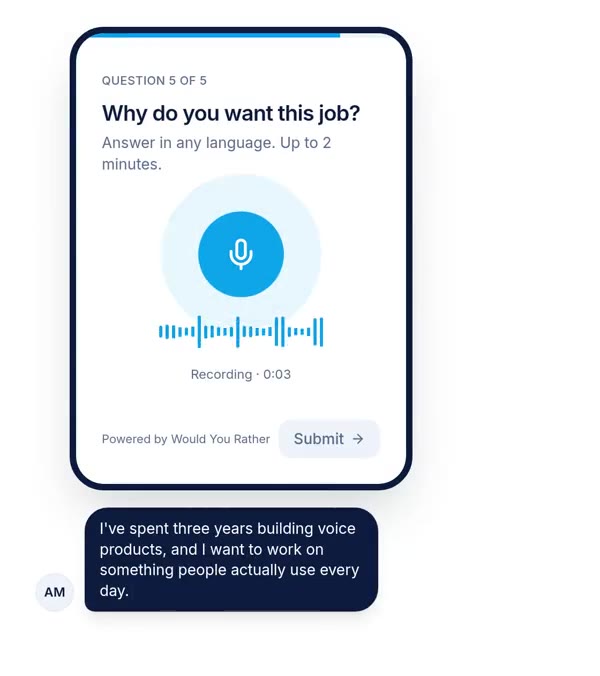
It is free to start. Video arrives through a photo or video upload field that can open the phone camera, not an in-page video recorder. Respondents sign in with Google by default, which is friction; you can switch on answers without sign-in per form, and you should for QR codes and events. It does not transcribe. Results sync to Google Sheets with audio links, which matters if you are moving from Google Forms. The head-to-head is in Would You Rather vs VideoAsk.
4. Typeform: polished, but voice sits on expensive plans
Typeform's Video and Audio question lets respondents answer by video, audio or text. Video and audio answers are available on Growth and Talent plans, and each answer can be up to 2 minutes, a limit that cannot be adjusted. Results show an auto-generated transcript, and closed captions are English only.
Its pricing page lists Talent at $169 a month, or $119 a month billed yearly, and marks video questions as not available on Basic, Plus and Business. That is a high price for one recorded question. If you already pay for Talent or Growth, use it. If not, rank it lower. More in Would You Rather vs Typeform.
5. Jotform: a voice widget inside a huge platform
Jotform's free Voice Recorder widget records through the phone or computer microphone, with a limit of up to 180 seconds. Jotform support has said it does not convert speech to text. Video goes through a File Upload field with the camera, or a Loom widget. Its free plan allows 100 submissions a month and 100 MB of upload space. Choose it when you need payments or signatures in the same form. Our full breakdown is in Would You Rather vs Jotform.
6. Voiceform: research-grade, opaque on price
Voiceform's pricing page lists voice response, audio and video recording, video response and screen recording question types. Its Lite plan includes 200 answers a month, 40 AI follow-ups and a 2 minute 30 second recording limit per question, with AI transcription and translation. Neither plan shows a price; there is a free trial and a "book a call" option. We rank it last for a Google Forms switcher only because you cannot see the cost up front. For research teams, it may rank first. See Would You Rather vs Voiceform.
What transcription costs you
Transcription is where these tools differ most, and it decides how much listening you will do. Only three tools show a price for a plan that includes it.
Transcripts are not free of work either. Typeform notes that its automated closed captions are English only. If your respondents speak Hindi, Tamil or mix languages mid-sentence, test transcript quality on a handful of real answers before you rely on it. A wrong transcript you trust is worse than no transcript, because nobody goes back to the audio.
If your tool does not transcribe, export the audio links and run them through a speech recognition engine you trust. Our voice survey research roundup summarises a 2025 study comparing two engines on survey answers.
When voice and video answers are the wrong choice
Recorded answers are not always better. The best evidence we know, a 2024 randomised experiment summarised in our voice survey analysis, found spoken answers ran about 2.5 times longer than typed ones. It also found that far more people abandoned the survey when they had to speak.
We would not make a voice or video question required unless the recording itself is the deliverable, as in a speaking test or a speech dataset. Offer a text fallback where your tool allows it. And we would not use video when audio will do: asking people to be filmed is a bigger request than asking them to talk.
What this ranking can't tell you
Three limits matter. First, we read vendor pages; we did not run the same form through all six tools with real respondents. Recording reliability on older phones, which matters a lot, is not something a pricing page tells you.
Second, some facts were thin. VideoAsk's prices come from the plan data its pricing page loads, not from a static table. Voiceform publishes no price, and we found no Voiceform page saying whether respondents need an account. Fillout's video capability is a "not found", not a confirmed "no".
Third, we make one of the six products. We placed it third because it does not transcribe and asks for sign-in by default, and those are real costs. You should still discount our view of ourselves.
How to choose in one afternoon
Use this sequence. It takes a few hours and costs nothing, because every tool here has a free plan or trial.
- 1Decide audio, video or bothIf faces do not change your decision, choose audio. It asks less of respondents.
- 2Decide who transcribesIf you need text, shortlist VideoAsk, Fillout Business, Typeform Talent or Voiceform. If you will listen, any tool works.
- 3Build the same one-question form in two toolsUse your real question and a stated time limit, for example up to 2 minutes.
- 4Test on an iPhone and an Android phoneCheck the microphone prompt, the recording, and that the answer arrives with audio attached.
- 5Send to 5 people and reviewPick the tool whose results you would actually sit and listen to.
References
- Google, Choose a type of question for your form, Google Docs Editors Help, accessed 8 October 2026. Used for Google Forms question types and the file upload sign-in rule.
- VideoAsk, Pricing, accessed 8 October 2026, including the plan data the page loads. Used for plan prices, processing minutes, steps and transcription availability.
- VideoAsk, Help Center, "Frequently asked questions", accessed 8 October 2026. Used for answer formats, no respondent account, and 2 and 5 minute recording limits.
- Typeform, Collect video and audio answers from respondents, updated 6 October 2026, and Typeform's pricing page. Used for plan availability, the 2 minute cap, transcripts and Talent pricing.
- Fillout, Voice recording help and Pricing, accessed 8 October 2026. Used for the voice field, upload limits, transcription plans and prices.
- Voiceform, Pricing, accessed 8 October 2026. Used for question types, Lite plan limits and transcription.
- Jotform pricing, Voice Recorder widget page and help article 576, accessed 8 October 2026. Used for the widget, its 180 second limit and free plan limits.
- SurveyMonkey question types help page and Phonic's website, accessed 8 October 2026. Used to exclude both tools.
The weakest point in this source base: every product fact comes from vendor pages that can change without notice, and none of the six tools was tested hands-on with real respondents for this ranking.
Questions people ask
Can Google Forms record audio answers?
No. Google Forms has no audio or video recording question type. Google's help page lists 12 question types, and the nearest option is file upload, where respondents record in another app and upload the file. Google states that responders must sign in to a Google Account to answer a file upload question, which rules out anonymous walk-up respondents.
What is the best Google Forms alternative with audio?
For most people, VideoAsk is the best overall pick because respondents can answer by video, audio or text without an account, and its free plan includes transcription. If you want a conventional form with one voice question, Fillout's voice recording field works on its free plan. If spoken answers are the main point, a voice-first builder such as Would You Rather fits better.
How do I create a form with voice recording?
Pick a form builder with a native voice field, add that field where you want a spoken answer, and set a time limit. Share the link or a QR code. Respondents tap the microphone in their phone browser, allow microphone access once, speak and submit. Test the link on both an iPhone and an Android phone before sending it widely.
Which form builders can transcribe voice answers automatically?
As of October 2026, VideoAsk lists transcription on all plans including free, Typeform shows auto-generated transcripts for video and audio answers on Talent and Growth plans, Fillout offers transcription on Business and Enterprise, and Voiceform lists AI transcription and translation. Jotform's Voice Recorder widget and Would You Rather store the audio without transcribing it.
Can respondents answer a form by video without an app?
Yes, with the right tool. VideoAsk and Typeform both let respondents record video answers in the browser, and VideoAsk states that respondents do not need an account. Fillout's voice field records audio only. Would You Rather and Jotform accept video through an upload field, which on a phone can open the camera to record a clip.
Is there a free form builder that accepts voice answers?
Yes. As of October 2026, VideoAsk's free Start plan includes 20 minutes of video or audio processing a month, Fillout's free plan includes its voice recording field with 1,000 responses a month, Jotform's free Voice Recorder widget works on its free Starter plan, and Would You Rather is free to start.
Drafted with AI from published research, then edited and approved by Apoorv Tamrkar.
Would you rather hear the answer?
Make a voice form in a minute. It’s free.
Create a form