Would You Rather vs Jotform: 20,000 Templates, or One Thing Done Well?
Jotform lists 20,000+ templates and caps free plans at 100 submissions a month. When it beats Would You Rather, and when a voice-first form is the better pick.
The short version
- Jotform is the more complete product. Its own pages list 20,000+ form templates, 150+ integrations, payments, e-signatures, HIPAA features on Gold and Enterprise, and an offline mobile app, as of October 2026.
- Voice is an add-on in Jotform, not the core. The Voice Recorder widget caps recordings at 180 seconds, and Jotform support says it does not convert speech to text.
- Jotform's free Starter plan allows 5 forms, 100 submissions a month and 100 MB of upload space; paid plans start at $39 a month, or $34 a month billed yearly.
- Pick Would You Rather when the spoken answer is the point of the form; pick Jotform when you need payments, signatures, approvals or compliance paperwork.
Jotform does more than Would You Rather, by a wide margin. Its template gallery alone lists more than 20,000 forms, and it ships payments, signatures, approvals and an offline mobile app. If you are searching for a Jotform alternative because you want more features, stop here: you will not find them with us. This comparison is for a narrower question: what you should use when the answer you want is spoken.
Jotform is a department store. Would You Rather is a single counter that only sells one thing. That is a real trade-off, not a slogan, and it cuts both ways. Below we set out where Jotform wins, where a voice-first form wins, and the exact limits behind both, all checked on Jotform's own pages as of October 2026.
Choose Jotform if your form needs payments, e-signatures, approval workflows, HIPAA features or thousands of ready templates. Choose Would You Rather if the most important answer on the form is spoken: it records the question in your voice, takes the reply by microphone in the phone browser, and keeps a text box optional. For most other forms, Jotform is the safer pick.
The short version: Jotform wins on breadth
We would rather say this plainly than bury it. Jotform is a mature forms platform with products we do not have and are not building. Its features page lists conditional logic, a report builder, Jotform Sign for e-signatures, Tables, Apps, Workflows for approvals, AI Agents, Smart PDF Forms, a store builder and an appointments product. It also says Jotform is trusted by over 40 million users.
Would You Rather does one job. It is a form builder where the main question can be asked and answered out loud. It has the field types most forms need, branching, branding and a Google Sheets sync. It does not take payments, collect signatures or route approvals.
Where Jotform is clearly the better choice
If any of these describe your form, use Jotform, or another full platform, and skip the rest of this post:
- You need to take payments. Jotform's features page lists payment gateway integrations.
- You need legally binding signatures. Jotform Sign covers that.
- You work in healthcare and need HIPAA features. Jotform's pricing page lists them on Gold and Enterprise.
- Staff collect data with no signal. Jotform's mobile app saves offline responses and syncs them later.
- You want a ready template for an obscure form type. With 20,000+ templates, one probably exists.
Where a voice-first form wins
A voice-first form wins when the spoken answer carries the value. Think of a screening question for a sales or support hire, a customer explaining why they cancelled, or a speaker reading a script for a speech dataset. In those cases the microphone is not one widget among 50. It is the reason the form exists, and the whole flow should be built around it.
We think that is a bigger difference than a feature table suggests. A tool built around voice makes different default choices, and defaults decide what most respondents actually do.
Jotform pricing and plan limits, as of October 2026
Jotform's free plan is generous for small jobs, and its limits are clear. The table below comes straight from its pricing page, accessed on 8 October 2026. Prices are in US dollars.
| Plan | Monthly price | Billed yearly | Active forms | Submissions a month | Upload space |
|---|---|---|---|---|---|
| Starter | Free | Free | 5 | 100 | 100 MB |
| Bronze | $39 | $34 a month ($408) | 25 | 1,000 | 1 GB |
| Silver | $49 | $39 a month ($468) | 50 | 2,500 | 10 GB |
| Gold | $129 | $99 a month ($1,188) | 100 | 10,000 | 100 GB |
| Enterprise | Custom | Custom | Unlimited | Unlimited | Unlimited |
Paid plans remove Jotform branding; the free plan keeps it. Enterprise is priced on request.
Upload space is the limit voice users hit first
For a voice form, the submission count is only half the story. Every recording is a file, and files draw on upload space. Jotform's free plan includes 100 MB of upload space, and its help centre tells you to check your plan's upload space before collecting audio or video. If you expect long spoken answers, budget for Bronze or Silver from the start.
On Would You Rather, the site says it is free to start. We are not quoting plan limits here because we have not published any, and we would rather you check the live site than trust a number in a blog post.
How voice works in Jotform
Jotform has no dedicated audio question type. You add voice through widgets, which are small add-ons in the builder's Widgets tab. Three are relevant, and they behave quite differently.
The Voice Recorder widget records, but does not transcribe
The main option is Jotform's free Voice Recorder widget. The widget page says respondents can record themselves by speaking into the microphone of their phone or computer. You can set a time limit and a beep when time runs out.
The recording limit can be set up to a maximum of 3 minutes, or 180 seconds. Respondents can play back a recording and re-record before submitting.
What it does not do is turn speech into text. In a support thread, Jotform staff wrote that the widget is purely a recording, and does not have the ability for text conversion. You get audio files, and transcription is your job.
- 1Open the form in Form BuilderClick Add Element on the left side of the builder.
- 2Go to the Widgets tabVoice capture lives in widgets, not in the basic field list.
- 3Add the Voice Recorder widgetPlace it where you want the spoken answer.
- 4Set the recording limitChoose a limit in seconds, up to 180, or leave it blank for the full maximum. Turn the end-of-recording beep on or off.
- 5Check your upload spaceRecordings count as uploads, so confirm your plan's allowance before you share the form widely.
Speech to Text gives you text, not audio
Jotform also offers a Speech to Text widget. Respondents speak, and the widget converts their words into editable text before submission. That is dictation. It is useful when you want typed data without typing, for example from people who find keyboards hard.
It is a different product from a voice answer. The widget page does not say whether the audio is kept, so assume you are collecting text. If tone, accent or the exact spoken words matter, as they do in hiring screens and speech data, dictation is the wrong tool.
Video goes through file upload or a Loom widget
For video, Jotform's help article describes the File Upload field. On the Jotform Mobile App, respondents tap Browse File and choose the camera to record. The same article states a maximum individual file size of 1 GB. Jotform's widget directory also lists a Loom Video Recorder widget, which needs a Loom developer app to set up.
Jotform's directory also lists a third-party widget from Voiceform for AI follow-up questions by voice. The widget page says a Voiceform account is required. We compare that product directly in Would You Rather vs Voiceform.
How voice works in Would You Rather
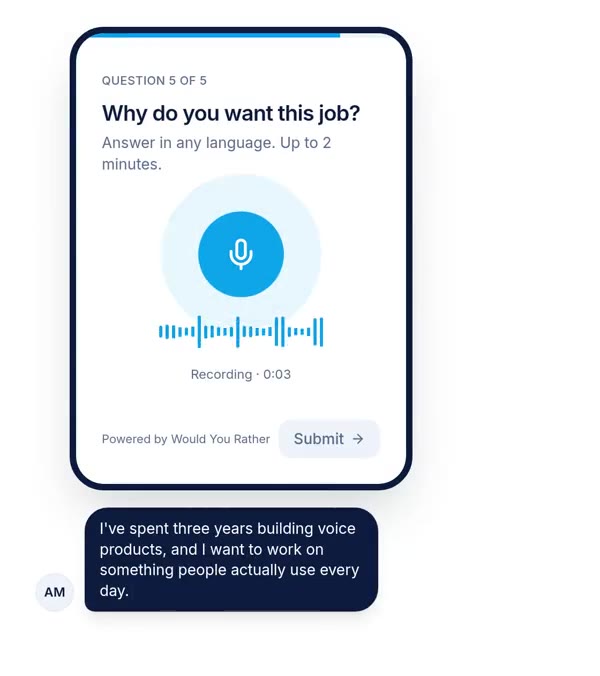
Would You Rather starts from the microphone. The voice field is a first-class question type, not a widget, and it shares the screen with nothing else.
Voice both ways
Creators can record the question in their own voice, so respondents hear a person rather than read a prompt. Respondents answer through the browser on their phone, with no app to install. You set a minimum and maximum length per question; the default maximum is 120 seconds.
An optional "or type your answer" box can sit under the microphone. It is off by default, and we suggest switching it on for most surveys. Our reasons are in our analysis of voice survey drop-off.
The rest of the form
The viewer shows one question at a time. Field types cover name, email, phone, short and long text, single and multiple choice, rating, date, number, file upload, and a photo or video upload that can use the phone camera. Section-level branching shows, skips or jumps based on earlier answers. Responses sync live to Google Sheets with audio links, and you can export CSV.
You can also describe a form, typed or spoken, and have AI draft it with field types chosen for you. Per-form branding covers logo, colours and fonts. Collaborators can be editors or viewers, and a public API with per-form keys reads approved responses and pushes submissions.
What Would You Rather does not do
It does not transcribe voice answers, so on transcription the two tools are level. It also has no payments, signatures, approval workflows, offline app or compliance certifications. For speech-data projects there is a transcript mode with on-screen transliteration suggestions for Indian languages, which is narrow but useful if that is your job.
Feature by feature: where each one wins
This table compares what matters for a form that collects spoken answers. Jotform facts come from its own pages as of October 2026. Would You Rather facts come from our product.
| Capability | Jotform | Would You Rather |
|---|---|---|
| Voice answer field | Voice Recorder widget, up to 180 seconds | Native voice field, min and max length you set |
| Question asked in your own voice | Not part of the Voice Recorder widget | Yes, record the prompt per question |
| Transcription of recordings | No; Speech to Text widget dictates text instead | No |
| Video answers | File Upload with camera, or Loom widget | Photo or video upload, gallery or phone camera |
| Respondent sign-in | Not needed for public link | Google sign-in by default; no-sign-in mode per form |
| Templates | 20,000+ | No template gallery; AI drafts a form from your description |
| Payments, signatures, approvals | Yes | No |
| HIPAA features | Gold and Enterprise | No |
| Offline data collection | Yes, mobile app | No |
The respondent sign-in row deserves a note. Jotform forms shared by direct link need no account, and Jotform's support pages say sign-in only applies to email invitations or assigned forms. Would You Rather asks respondents to sign in with Google unless you switch on answers without sign-in for that form. For walk-up and QR code forms at events, turn that setting on.
Which one to pick, by use case
The right choice follows from what the form is for. Here is how we would decide.
Pick Jotform for operational forms
Order forms, registrations with payment, consent forms that need a signature, patient intake, inspection checklists and anything with an approval chain. These are Jotform's home ground. A voice answer is at most a nice extra, and the Voice Recorder widget handles an occasional recording well enough.
Pick Would You Rather when the voice is the data
Spoken screening questions for hiring, customer interviews at scale, oral assignments, speaking tests and speech-data collection. In these, you will play back hundreds of recordings, so the recording experience and the review flow are the product. Our voice screening questions for hiring shows the kind of prompts that earn a spoken answer.
Use both if you already pay for Jotform
We would not tell a team happily running 40 forms in Jotform to migrate. If one workflow needs rich spoken answers, run that single form in a voice-first tool and keep the rest where they are. That is a cheap experiment, and it is easy to reverse.
What this comparison can't tell you
This is a comparison written by one of the two products in it. Read it with that in mind. We have tried to source every Jotform claim to Jotform's own pages, but we have not run a structured test of both tools with real respondents.
Several Jotform facts come from support forum replies rather than formal documentation, including the transcription answer and the sign-in rules. Support replies can go stale. Jotform's help article on recording is also written for its mobile app, so browser behaviour may differ.
Template counts are the vendor's own and are marketing numbers. Jotform's features page itself states two different integration counts, 150+ and 200+. Prices and limits change, so check the pricing page on the day you decide.
Finally, we have no independent evidence that a voice-first design gets more or better answers than Jotform's widget. The research on voice answers in general is in our voice survey analysis. It shows spoken answers run longer, and also that voice-only questions lose more people.
How to decide in 30 minutes
Write down the single most important question on your form. If its answer is a value, a payment or a signature, open Jotform and pick a template. If its answer is a story, an opinion or a sample of someone's speech, build that one question in both tools.
Send each version to 5 colleagues on their phones. Watch where they hesitate, how long the recordings are and how easy the answers are to review afterwards. Then pick the one whose results you would actually listen to. If you are still weighing other options, our roundup of Google Forms alternatives that accept voice and video covers more tools.
References
- Jotform, Pricing, accessed 8 October 2026. Used for plan prices, submission limits, form limits, upload space, branding and HIPAA plan availability.
- Jotform, Form Templates, accessed 8 October 2026. Used for the 20,000+ template count.
- Jotform, Features, accessed 8 October 2026. Used for the product list, conditional logic, offline mobile app, integrations and user count.
- Jotform, Voice Recorder widget, accessed 8 October 2026. Used for how the widget records and its settings.
- Jotform, How to Record Audio and Video on Mobile Forms, last updated 16 March 2026. Used for the 180-second limit, setup steps, video via File Upload and the 1 GB file size cap.
- Jotform support, Ability to transcribe voice input to text output, 2025 to 2026. Used for the statement that the Voice Recorder does not transcribe.
- Jotform, Speech to Text widget, accessed 8 October 2026. Used for how dictation works.
- Would You Rather product code and settings, checked 8 October 2026. Used for every Would You Rather feature claim.
The weakest point in this source base: several Jotform behaviours rest on public support replies and a mobile-app help article, not on formal browser documentation, and nobody independent has tested the two products side by side.
Questions people ask
Does Jotform have a voice recorder?
Yes. Jotform offers a free Voice Recorder widget that you add from the Widgets tab of the form builder. Respondents record through their device microphone, and you can set a recording limit of up to 180 seconds, according to Jotform's help centre. Jotform support has said the widget is purely a recording and does not convert speech to text.
Can Jotform transcribe audio answers?
Not from the Voice Recorder widget. Jotform support stated in 2025 that the widget does not have the ability for text conversion. Jotform separately offers a Speech to Text widget, where respondents dictate an answer and edit the text before submitting. That gives you text instead of a recording, which suits short factual answers more than interviews or speech samples.
How many submissions does the Jotform free plan allow?
As of October 2026, Jotform's free Starter plan allows 100 submissions a month, 5 active forms, 10,000 monthly form views and 100 MB of upload space. Recordings and file uploads count against that upload space. The Bronze plan raises submissions to 1,000 a month for $39 a month, or $34 a month when billed yearly.
What is the best Jotform alternative for voice answers?
It depends on how central voice is. If you need a full forms platform with payments and signatures plus the odd recording, Jotform's own Voice Recorder widget may be enough. If spoken answers are the main thing you collect, a voice-first builder such as Would You Rather puts the microphone at the centre and lets you record the question in your own voice too.
Do respondents need a Jotform account to fill out a form?
No, not if the form is public and you share its direct link. Jotform support has explained that respondents only need to sign in when you invite them by email or assign the form to them. Would You Rather asks respondents to sign in with Google by default, and you can switch on answers without sign-in per form.
Is Jotform free?
Jotform has a free Starter plan with no time limit. As of October 2026 it covers 5 forms, 100 submissions a month and 100 MB of upload space, and it shows Jotform branding. Paid plans are Bronze at $39 a month, Silver at $49 and Gold at $129, with lower prices when billed yearly and custom Enterprise pricing.
Drafted with AI from published research, then edited and approved by Apoorv Tamrkar.
Would you rather hear the answer?
Make a voice form in a minute. It’s free.
Create a form