5 Best Voice Survey Tools in 2026, Compared From Their Own Docs and Pricing Pages
5 voice survey tools that still collect spoken answers in October 2026, compared from public docs and pricing: limits, transcription, cost, one weakness each.
The short version
- Five tools still collect spoken answers as of October 2026: Voiceform, VideoAsk, Speak AI, Jotform's Voice Recorder widget and Would You Rather. Phonic's site now sells voice agents, not surveys.
- Transcription is the biggest split. VideoAsk, Voiceform and Speak AI list automatic transcription on their own pages; Jotform's widget page and Would You Rather do not transcribe.
- Free entry varies a lot: VideoAsk's Start plan gives 20 minutes of audio or video processing a month, Jotform's free Starter plan 100 submissions a month, Voiceform offers a trial.
- We compared from public documentation only, not hands-on testing, so run a 10-person pilot on your top two before you commit.
Five tools still let you collect spoken answers through a survey link as of October 2026, and they split cleanly on one question: what happens after the recording. Three of them transcribe every answer automatically. Two, including ours, hand you the audio and stop there. That split matters more than any feature list when you pick voice survey tools.
We did not hands-on test these tools. Every claim below comes from each vendor's own pricing page, product page or help centre, opened on 8 October 2026. Where a page was vague or contradicted itself, we say so. Treat this as a map, then run your own pilot.
The best voice survey tool depends on what you do with the audio. Pick Voiceform or Speak AI if you need automatic transcripts and AI analysis. Pick VideoAsk for conversational video and audio answers. Use Jotform's free Voice Recorder widget if you already run Jotform. Pick Would You Rather for a voice-first form with a text fallback.
How we compared these voice survey tools
We compared five tools from public documentation. No account was opened, no form was built, and no answer was recorded for this post. That is a real limit, and it is why every claim links to the page it came from.
We started from tools that let a respondent record a spoken answer inside a survey or form. Phone and IVR survey platforms are out of scope. So are meeting recorders and transcription apps that only process audio you already have. We also left out general form builders that only accept an uploaded audio file, because that is a workaround, not a voice field.
The selection criteria and their weights
We weighted six criteria by how much they change the outcome of a typical voice survey. Respondent friction comes first because a voice question already loses more people than a text box, as we show in our analysis of voice survey drop-off.
| Criterion | Weight | What we looked for in the docs |
|---|---|---|
| Respondent friction | 25% | No app, no account, works in a phone browser |
| Voice answer controls | 20% | Time limits, a text fallback, required or optional answers |
| Transcription and analysis | 20% | Automatic transcripts, languages, search, summaries |
| Price and free entry | 15% | A published price, a free plan or trial, what the meter counts |
| Rest of the form | 10% | Other field types, logic, branding |
| Getting data out | 10% | CSV export, spreadsheets, API or webhooks |
- Respondent friction25%
- Voice answer controls20%
- Transcription and analysis20%
- Price and free entry15%
- Rest of the form10%
- Getting data out10%
We did not turn the weights into a single score. A score would imply we had measured something. Instead, the weights decide what each tool section talks about first.
Voiceform: the research-heavy choice
Voiceform is built for market and customer research teams. Its pricing page lists voice response, voice plus text response and video response question types. It also lists AI probing, AI summaries, sentiment analysis and theme extraction. As of October 2026, the site footer reads "© 2026 by Voiceform Inc." and the status line says systems are running.
The entry plan is called Voiceform Lite. Lite includes 200 answers a month, 40 AI follow-ups a month and a 2 minute 30 second recording limit per question. It lists AI transcription and translation. Larger plans are custom and sold through a call.
Voiceform's honest weakness
The pricing page shows no dollar figure for Lite. It offers a free trial button and a "Book a call" path for custom plans. If you need to budget before you talk to sales, that is friction. We think a research team with a real budget will not mind. A solo founder testing one question probably will.
Voiceform wins on analysis depth. If you want AI follow-up questions and theme extraction in one place, it is the strongest documented option here. We compare it with our own tool in Would You Rather vs Voiceform.
VideoAsk: the conversational video-first choice
VideoAsk, owned by Typeform, builds conversations out of steps. Each step can be a video from you and an answer from the respondent. Its open-ended answer type collects video, audio or text, and you can switch any of those off. That means you can run an audio-only step if you want one.
The VideoAsk pricing page is unusually clear. The free Start plan includes 20 minutes of video or audio processing a month and up to 3 steps per videoask. Grow costs $24 a month billed yearly for 1,200 minutes a year. Brand starts at $40 a month billed yearly with 2,400 minutes a year.
Start lists voice-text transcription and captions. VideoAsk's help centre says every audio or video answer generates a transcript automatically, and that you can edit the words afterwards. Answers default to 2 minutes, and paid plans can raise the limit to 5.
VideoAsk's honest weakness
The meter counts minutes of processing, not responses. Your own prompt videos count too. The pricing page's own example reaches 151 minutes in a month from one two-step flow, 50 respondents and video follow-ups. That is far past the free 20. Its help centre also says each step requires a response and steps cannot be skipped, so there is no optional voice question inside a step.
We would pick VideoAsk when the face matters, such as testimonials or hiring screens where you want to see the person. For voice alone, the video-first framing adds weight you may not need. More in Would You Rather vs VideoAsk.
Speak AI: the analysis platform with a recorder
Speak AI is a transcription and analysis platform first. Its recorder and surveys sit on top. Its audio and video surveys page says participants need no account, surveys can be shared by link or iframe embed, and every recording is transcribed on ingest. That page is Speak AI's audio and video surveys page.
On the Speak AI pricing page, the Pro plan lists "Branded recorder and surveys". Pro costs US$25 per user per month, or US$20 billed annually, for up to 5 users. Each seat gets about 25 hours of standard transcription and 10 GB of storage. A pay-as-you-go option charges credits per hour of transcription. There is a 7-day free trial.
Speak AI's honest weakness
The survey builder is not the centre of the product, and the documentation shows it. The surveys page gives no numeric limits for recording length or response counts. It also states two language counts: "over 100 languages" in the body and "50+ languages" in the page metadata. If your respondents speak a less common language, test it before you trust either figure.
We think Speak AI is the right pick when you already have hours of interviews to analyse, and survey answers are one more input. It is a heavier buy if all you need is one spoken question on a form.
Jotform Voice Recorder: the cheapest path if you already use Jotform
Jotform does not have a native voice question. It has a free widget. The Voice Recorder widget page says respondents record "directly into the microphone of their phone or computer". You can set a recording length limit and a beep at the end.
Jotform's help article on recording audio, last updated 16 March 2026, sets the cap. The Voice Recorder's limit can be set in seconds, up to a maximum of 3 minutes. That article walks through the Jotform mobile app, so the web form behaviour is documented less directly.
The wider product is the draw. Jotform's pricing page lists a free Starter plan with 100 monthly submissions and 100 MB of upload space. Bronze costs $39 a month, or $408 a year, for 1,000 submissions. You get every other Jotform field, logic and integration alongside the recorder.
Jotform's honest weakness
Neither the widget page nor the help article mentions transcription. Recordings are files you play back one at a time. On the free plan, 100 MB of upload space also fills up faster with audio than with text. We would use the widget for a handful of spoken answers inside a larger Jotform form, not for a voice-led study. See Would You Rather vs Jotform.
Would You Rather: voice-first forms, no transcripts
This is our product, so read this section with that in mind. Would You Rather is a form builder where voice is a first-class field, not a widget. Respondents see one question at a time in the phone browser, with no app. They tap a microphone, speak and move on.
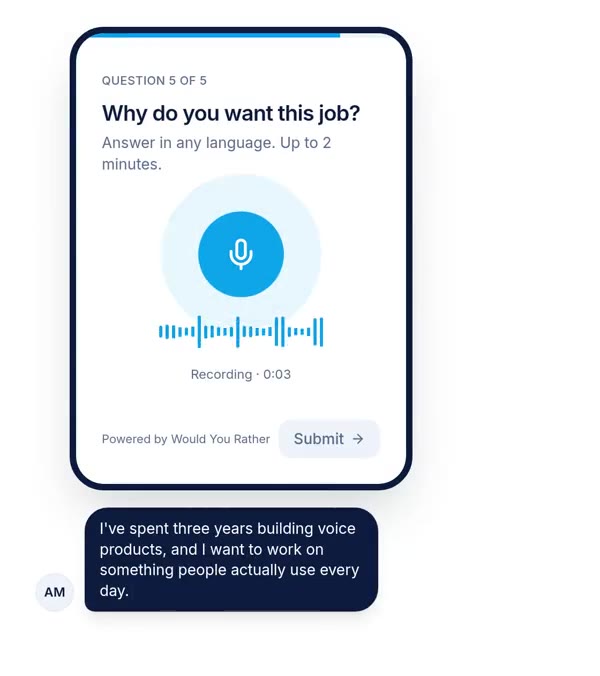
Creators can record each question in their own voice, too. The voice field takes a minimum and a maximum length in seconds, with no maximum unless you set one. An optional "type instead" text box can sit beside the microphone. It is off by default, and we think you should switch it on for most surveys.
What else Would You Rather does
The builder drafts a form from a typed or spoken description and picks the field types. Forms support section-level branching, branding with your logo and colours, and editor or viewer collaborators. Answers sync live to Google Sheets with audio links, or export as CSV, which we cover in sending form responses to Google Sheets. There is a public API with per-form keys. Forms can accept anonymous answers without sign-in, which suits QR codes at events.
A transcript mode exists for script-reading forms. It shows on-screen transliteration suggestions for Indian languages, which matters for speech data collection. It helps people read a script aloud. It does not transcribe what they say.
Would You Rather's honest weaknesses
We do not auto-transcribe voice answers. There is no sentiment analysis and no AI summary of what people said. If you collect 500 recordings, you will listen to them or export the audio links and run them through a speech-to-text engine yourself. On the criteria above, that costs us most of the 20% transcription weight.
The site says the product is free to start. We do not publish paid plan prices in this post, so you cannot compare our cost line by line with VideoAsk or Jotform yet. We would rather say that than guess.
Side by side: what each tool documents
This table only contains what each vendor's own pages said on 8 October 2026. A blank in the docs is marked as "not stated", not as "no".
| Tool | Voice answer field | Automatic transcription | Free entry | Cheapest listed paid plan | Where it beats Would You Rather |
|---|---|---|---|---|---|
| Voiceform | Native voice, voice plus text, video | Listed on Lite | Free trial | Lite price not shown; custom by call | AI probing, summaries, themes |
| VideoAsk | Open-ended step: video, audio or text | Yes, per its help centre | $0 Start, 20 min a month | Grow, $24 a month billed yearly | Video answers, live calls, transcripts |
| Speak AI | Recorder and surveys, link or embed | Yes, on ingest | 7-day trial | Pro, US$20 per user a month billed yearly | Deep transcript analysis |
| Jotform | Voice Recorder widget | Not stated | $0 Starter, 100 submissions a month | Bronze, $39 a month | Huge field and integration library |
| Would You Rather | Native voice field, optional text fallback | No | Free to start | Not published here | Not applicable (our product) |
Recording length is the one number most tools publish, so here it is on one chart.
The tool that is no longer a voice survey tool
Phonic used to appear on every list of voice survey tools. As of 8 October 2026, Phonic's homepage describes a speech-to-speech voice agent platform for recruiting screens, patient intake and support. It lists no survey product. Search engines still index a Phonic page that announced the survey product's discontinuation, and that page now returns a 404.
We mention this because older roundups still recommend Phonic. If a list you are reading includes it without a caveat, check the date on that list. A Google Forms workaround is also not a voice survey tool, and we explain why in whether Google Forms can record audio.
What this comparison does not tell you
The biggest gap is the one we flagged at the top. We did not test these tools. We cannot tell you how fast each recorder starts on a cheap Android phone, how many respondents abandon at the microphone permission prompt, or how accurate each transcript is in Hindi or Tamil. Those are the things that decide a real project.
Second, documentation lags products. Each of these vendors can change a price or a limit next week. Every figure here is stated as of October 2026, and you should reopen the linked page before you buy.
Third, the weights are ours. A team that lives on transcripts would weight analysis at 40% and push Voiceform and Speak AI to the top. A team running a QR code at a rural health camp would weight friction even higher than we did. Neither is wrong.
Fourth, we have an obvious conflict of interest. We tried to handle it by writing down our own weaknesses first and linking every competitor claim to that competitor's own page. You can judge whether that worked.
How to choose in one afternoon
Do not pick from a table. Pick two candidates from the table, then let ten real respondents choose for you.
- 1Write one spoken questionUse a story prompt, such as "Tell us about the last time this nearly made you give up". Put it after two easy tap questions.
- 2Build it in both toolsSame wording, same time limit, same text fallback setting if the tool has one. Note how long each build takes you.
- 3Send each link to 5 peopleUse the phones your real respondents use. Ask at least two of them to answer somewhere a little noisy.
- 4Count three numbersHow many answered the voice question, how long the answers ran, and how many asked you for help.
- 5Check the exportOpen the CSV or sheet. Can you play each recording, see who said it and move it into your analysis tool?
If transcripts are non-negotiable, shortlist VideoAsk and Voiceform. If you want the lowest cost and already use Jotform, try the widget first. If you want a voice-first form that respondents finish on a phone browser, put Would You Rather in the pilot and judge it on the same three numbers.
References
- Voiceform, Pricing, opened 8 October 2026. Used for Lite plan limits, question types, transcription and analysis features.
- VideoAsk, Pricing, opened 8 October 2026. Used for plan prices, processing minutes and the 151-minute example. VideoAsk help centre articles on answer types, transcripts and answer length were also read for step and transcript behaviour.
- Speak AI, Pricing, opened 8 October 2026. Used for Pro and pay-as-you-go prices, transcription hours and storage.
- Speak AI, Audio and video surveys, opened 8 October 2026. Used for no-account participation, link and embed sharing, transcription on ingest and the conflicting language counts.
- Jotform, Voice Recorder widget, opened 8 October 2026. Used for widget capabilities.
- Jotform, How to record audio and video on mobile forms, last updated 16 March 2026. Used for the 3-minute recording maximum.
- Jotform, Pricing, opened 8 October 2026. Used for Starter and Bronze plan prices and limits.
- Phonic, Homepage, opened 8 October 2026. Used for Phonic's current product focus.
The weakest thing about this source base: every competitor fact comes from the vendor's own marketing or help pages, which describe what a product should do, not what respondents actually experience.
Questions people ask
What is the best voice survey tool?
It depends on what happens after the recording. If you need automatic transcripts and AI analysis, Voiceform or Speak AI fit best. If you want video and audio answers in a conversational flow, VideoAsk is the strongest option. If you already run Jotform, its free Voice Recorder widget is the cheapest path. If you want a voice-first form with text fallback and no app, try Would You Rather.
Is there a free voice survey app?
Yes, with limits. As of October 2026, VideoAsk's Start plan costs $0 and includes 20 minutes of video or audio processing per month. Jotform's Starter plan is free with 100 monthly submissions, and its Voice Recorder widget is listed as free. Would You Rather is free to start. Voiceform and Speak AI offer trials rather than permanent free plans for their recording features.
Can a voice survey transcribe answers automatically?
Some can. VideoAsk's help centre says every audio or video answer automatically generates a transcript. Voiceform lists AI transcription and translation on its Lite plan, and Speak AI says every recording is transcribed on ingest. Jotform's widget pages do not mention transcription, and Would You Rather does not transcribe today, so you would export audio and run it through a speech-to-text engine.
Do respondents need an app to answer a voice survey?
Not with most web tools. Speak AI says its surveys need no app downloads and no participant accounts. Would You Rather records in the phone browser from a link or QR code. Jotform's help article on recording audio describes its mobile app flow, so check the web form behaviour yourself before you rely on it for respondents who will not install anything.
What happened to Phonic voice surveys?
Phonic no longer sells a survey product. As of 8 October 2026, its homepage describes a speech-to-speech voice agent platform for things like recruiting screens and customer support, with no survey product listed. If you had data on the old Phonic survey platform, contact Phonic directly. For new projects, pick one of the tools that still offers voice answer fields.
How long can a voice survey answer be?
It depends on the tool and plan. As of October 2026, Voiceform's Lite plan caps each recorded answer at 2 minutes 30 seconds. VideoAsk defaults to 2 minutes and paid plans can raise it to 5. Jotform's help article gives its Voice Recorder a 3-minute maximum. Would You Rather lets the creator set a minimum and maximum in seconds per question.
Drafted with AI from published research, then edited and approved by Apoorv Tamrkar.
Would you rather hear the answer?
Make a voice form in a minute. It’s free.
Create a form