Would You Rather vs Google Forms: When Free Isn't Enough for the Answers You Need
Google Forms has 12 question types and none takes a spoken answer. When free Google Forms is the right pick, and when a voice-first form is worth switching to.
The short version
- Google Forms lists 12 question types and none of them records audio. The usual workaround is a file upload question, and Google's help page says responders must sign in to a Google Account to answer it.
- Google Forms is the better default for most forms: it is free with a personal Google account, accepts up to 500,000 responses per form, and links to Google Sheets in two clicks.
- Spoken answers carry more: a 2024 randomised experiment with 1,001 smartphone respondents found voice answers had more words and more topics than typed ones.
- Switch to a voice-first form only for the questions where you want reasons, tone or a recording itself, and keep Google Forms for everything that is a tick box.
Google Forms is the best free form builder most people will ever need, and it cannot take a voice answer. Its help centre lists 12 question types, from short answer to time, and not one records audio. So the honest case for a Google Forms alternative is narrow: it exists only when the answer you need is spoken.
Google Forms can't hear your respondents. Here's what that costs you, and when it costs nothing at all. We read Google's own help pages for every limit in this post, then set them against what a voice-first form does differently. If your form is a list of tick boxes, stay where you are.
Use Google Forms when your questions have short, factual answers: registrations, quizzes, sign-ups, internal checklists. It is free, familiar and wired into Google Sheets. Use a voice-first form like Would You Rather when you need people to explain themselves out loud, without signing in to anything. Many teams sensibly run both.
What Google Forms does better than almost anything
Start with the fair part. Google Forms is free with a personal Google account, most people have filled one in, and it asks nothing of the form creator beyond a browser. That familiarity is worth more than any feature list. A respondent who recognises a Google Form knows what to expect, and expectations lower drop-off.
The limits are generous too. Each form can receive up to 500,000 responses and hold up to 1 GB of total storage, according to Google's response management page. The same page notes that Sheets syncing can struggle past 100,000 responses, which tells you the scale Google designs for.
Google Sheets is built in, not bolted on
Click Responses, then Link to Sheets, and every new answer becomes a row. No connector, no third-party account, no API key. For teams who already live in a spreadsheet, that is the whole product. We cover the same job in other tools in sending form responses to Google Sheets.
Workspace adds controls a small tool can't match
On paid Google Workspace plans, administrators get controls that matter in large organisations. A form can be restricted to a domain, a group or named people. Data regions let eligible editions keep Forms responses in the United States or Europe, per Google's data regions coverage table.
Google has also added AI to the results view. Gemini can summarise text responses once a question has between 3 and 200 responses, on eligible Workspace or Google AI plans. That matters, because it works on typed answers today, while Would You Rather does not transcribe or summarise voice answers at all.
Small touches that keep improving
In January 2026, Google added automatic closing by date or by response count, for personal accounts as well as Workspace. Quizzes, response validation and section branching are all built in. We think Google Forms is underrated precisely because it is free and everywhere.
Where Google Forms runs out: the spoken answer
The gap is not a missing feature on a long list. It is one specific job: hearing what somebody actually thinks, in their own words, at their own pace. Google Forms has a paragraph box for that, and typing into a paragraph box on a phone is slow.
Speech is much faster than thumbs. In a lab study, English speech entry ran at 153 words per minute against 52 on the keyboard. That was people transcribing set phrases, not answering open questions, so it overstates the gap for real surveys. The direction is what matters.
- Keyboard
- Speech
Spoken answers say more
Speed would not matter if the extra words were filler. Survey methodologists have tested this directly. In a 2024 randomised experiment, Höhne, Gavras and Claassen assigned 1,001 smartphone respondents to type or speak their answers to four open questions. Voice answers averaged about 55 words against about 22 typed, and covered more topics.
The same paper is honest about the catch: far more voice respondents broke off before answering. We unpack that trade-off in our analysis of voice surveys and drop-off. The short version is that voice works best as an option beside a text box, not as a replacement.
The Google Forms audio workaround, and what it asks of respondents
People do collect audio with Google Forms. They use a file upload question and ask respondents to record somewhere else. It works, and it shifts every bit of the effort onto the person answering.
- 1Leave the formThe respondent switches to a voice recorder app, which may or may not be installed, and records their answer there.
- 2Find and name the fileThey locate the recording in their phone's storage, where the file name is usually a timestamp.
- 3Come back and sign inGoogle's help page states that responders need to sign in to a Google Account to answer a file upload question.
- 4Upload and waitThe file uploads to a new folder in the form owner's Google Drive and counts against the owner's storage.
- 5Match the file to the personYou open Drive and pair each audio file with its row in the response sheet.
Google's question types page is explicit on the sign-in rule. It also says file upload is unavailable when the form sits in a shared drive or when an administrator has turned on data loss prevention. For a classroom of Google accounts, none of that matters. For customers, candidates or field respondents, the sign-in step alone can end the exercise. We list the other routes in whether Google Forms can record audio.
What a voice-first form does differently
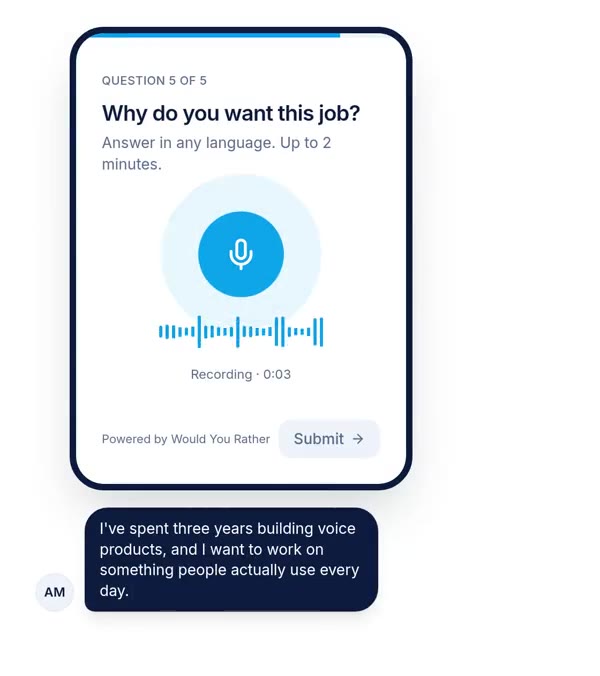
Would You Rather was built around the question Google Forms leaves out. A voice answer is a field type, like a date or a rating, not a file someone has to bring with them.
Voice both ways
Respondents tap a microphone in their phone browser, speak and submit. No app, and no account if you switch on anonymous answers for that form. You set a minimum and maximum recording length per question. You can also turn on an "or type your answer" box beside the microphone, which is off by default and which we would switch on for most audiences.
Creators can record the question in their own voice, so the respondent hears a person ask it. For speech-data projects there is a transcript mode for script reading, with on-screen transliteration suggestions for Indian languages. See collecting answers in Hindi, Tamil or any language.
One question at a time, built for the phone
The respondent view shows one question per screen, which suits a microphone better than a long scrolling page. Responses can be resumed if someone leaves halfway. Branching works at section level: show, skip or jump based on earlier answers, the same idea as Google's "go to section based on answer". Forms can carry your logo, colours and fonts.
Results where you already work
Answers sync live to Google Sheets with a link to each recording, or export as CSV. There is a per-form public API for reading approved responses and pushing submissions, and per-form collaborators with editor or viewer roles. Our site says it is free to start. We are not going to quote plan limits here, because that is not the reason to choose it.
Side by side: Would You Rather vs Google Forms
Facts about Google Forms below come from Google's help pages as of October 2026. Facts about Would You Rather come from the product itself.
| Google Forms | Would You Rather | |
|---|---|---|
| Spoken answer in the browser | No audio question type | Native voice field with min and max length |
| Audio via upload | File upload, respondent must sign in to Google | Not needed |
| Answer without any account | Yes, unless upload, one-response limit or restricted access is on | Yes, per-form anonymous setting |
| Typed answer beside the microphone | Not applicable | Optional "or type" box, off by default |
| Layout | Pages split by sections | One question per screen |
| Branching | Go to section based on multiple choice or dropdown answer | Section-level show, skip and jump |
| Google Sheets | Native link, two clicks | Live sync with audio links |
| AI on results | Gemini summaries of text answers on eligible plans | None; no transcription or summaries |
| Admin controls and data regions | Workspace domain controls; US or EU data regions on eligible editions | Per-form collaborators only; no data region choice |
| Scale and track record | Up to 500,000 responses per form, a mature Google product | Young product, far smaller |
The last three rows are where Google Forms wins outright, and they are not small. If you need an administrator to control who can respond, a contract that pins data to Europe, or AI summaries of thousands of typed comments, Google Forms is the better tool today.
Use Google Forms when, use Would You Rather when
We think most organisations should keep Google Forms as their default and add a voice form only for the questions that need one. That is a less exciting answer than "switch everything", and it is the right one.
Use Google Forms when the answer is a value
Registrations, RSVPs, quizzes with grading, attendance, order forms and internal requests all have short, factual answers. A tap or a short text box is faster than speaking. Your respondents are inside your Google Workspace domain and already signed in. You want Gemini to summarise a few hundred typed comments. Or the budget is exactly zero and the form is simple.
Use Would You Rather when the answer is a reason
Hiring screens where you want to hear how a candidate explains a decision. Customer feedback where tone tells you more than a score. Field research with respondents who speak more easily than they write, in the language they think in. Speaking tests, oral assignments and speech-data collection, where the recording is the deliverable. Events where people scan a QR code and answer in 30 seconds without signing in; see QR code forms for events.
Or run both
A common pattern needs no migration at all. Keep the logistics in Google Forms, then send one short voice form for the question that matters. If you are comparing more paid tools first, read our neutral Google Forms vs Typeform comparison, and note that Typeform also offers audio answers on some paid plans.
Where this comparison is weakest
We make Would You Rather, so read this section first if you read only one. Four limits are worth stating plainly.
First, the evidence for richer spoken answers comes mainly from one German experiment with a paid online panel, answering sensitive political questions. Your respondents, topics and languages may behave differently. Second, the speed figures come from a lab study of people transcribing set phrases, not answering open questions.
Third, Google Forms changes often, and quietly. The per-form response cap and automatic closing both arrived in 2026. Check Google's help pages before relying on any limit we quote. Fourth, Would You Rather does not transcribe recordings. If you need searchable text from hundreds of answers, you will need a separate transcription step, and that cost is real.
The strongest counter-argument deserves its own line. For many teams the right answer is a better typed question in Google Forms, not a microphone. A sharp prompt in a paragraph box beats a vague prompt with a voice field.
How to decide in 10 minutes
Open your current Google Form and read every question. Mark each one as a value (a name, a date, a choice) or a reason (why, how, tell us about). If every question is a value, stay on Google Forms and stop reading comparison posts.
If one or two are reasons, rebuild just those as a short voice form, with a text box beside the microphone and a stated time limit. Send it to 20 people who would have filled in the old form. Then compare what you hear against what the old paragraph boxes gave you. That test costs you an afternoon and answers the question better than any feature table, including ours.
References
- Google, Choose a type of question for your form, Google Docs Editors Help, accessed 8 October 2026. Used for the 12 question types, the file upload sign-in rule and when file upload is unavailable.
- Google, View and manage form responses, Google Docs Editors Help, accessed 8 October 2026. Used for the 500,000 response and 1 GB limits, CSV download and Sheets linking.
- Google, Data covered by data regions, Google Workspace Admin Help, accessed 8 October 2026. Used for Forms data region coverage and eligible editions.
- Google, Summarize and analyze responses with Gemini in Google Forms, Google Docs Editors Help, accessed 8 October 2026. Used for Gemini summary requirements and the 3 to 200 response range.
- Google Workspace Updates, Set Google Forms to automatically stop accepting responses, 12 January 2026. Used for automatic closing and availability on personal accounts.
- Höhne, J. K., Gavras, K. and Claassen, J., Typing or Speaking? Comparing Text and Voice Answers to Open Questions on Sensitive Topics in Smartphone Surveys, Social Science Computer Review, 2024. Used for answer length and topics, typed vs spoken.
- Ruan, S., Wobbrock, J. O., Liou, K., Ng, A. and Landay, J. A., Speech Is 3x Faster than Typing for English and Mandarin Text Entry on Mobile Devices, arXiv, 2016. Used for words per minute, speech vs keyboard.
The weakest point in this source base: the case for spoken answers rests on one survey experiment and one lab study, and neither tested a product form like the ones compared here.
Questions people ask
Can Google Forms record voice answers?
No. Google's help page lists 12 question types, from short answer to time, and none records audio. The closest option is a file upload question, where respondents record in another app and upload the file. Google states that responders must sign in to a Google Account to answer a file upload question, and the files land in the form owner's Google Drive. If you need spoken answers without sign-in, you need a form builder with a native voice field.
What is the best Google Forms alternative for voice recording?
Pick a form builder with a native voice answer field, so respondents tap a microphone in their browser instead of recording elsewhere and uploading. Check four things: whether respondents must sign in, whether a text option can sit beside the microphone, whether you can cap recording length, and how recordings reach your spreadsheet. Would You Rather does all four. Typeform offers audio answers on its Growth and Talent plans.
Is Google Forms free?
Yes, for personal Google accounts. Google's own announcements list features as available to personal Google account users as well as Workspace customers. Paid Google Workspace plans add administration features, such as controlling who inside an organisation can respond, data regions on eligible editions and Gemini response summaries on eligible plans. Uploaded files count against the form owner's Google Drive storage.
Why does Google Forms ask respondents to sign in?
Certain features need to know who is answering. Google's help pages say a file upload question requires responders to sign in to a Google Account, and the publish settings can restrict a form to a domain, group or named people, which also needs sign-in. Turning on a one-response limit has the same effect. If you want anonymous answers from anyone with the link, avoid those settings.
How many responses can a Google Form take?
Google's help page says each form can receive up to 500,000 responses, with up to 1 GB of total storage per form, under limits that started in September 2026. The 1 GB covers the form and response data but not uploaded files. Google also notes that Sheets syncing can lag on forms with more than 100,000 responses, and you can set a form to close itself after a chosen number.
Should I switch from Google Forms to a voice form builder?
Only if your forms include questions where the reason matters more than the value. Registrations, quizzes, sign-ups and internal checklists belong in Google Forms. Screening interviews, customer feedback, field research and speaking tasks are where a voice field earns its place. Many teams run both: Google Forms for the logistics, a voice form for the one question where people need to explain themselves.
Drafted with AI from published research and Google's own help pages, then edited and approved by Apoorv Tamrkar.
Would you rather hear the answer?
Make a voice form in a minute. It’s free.
Create a form