Forms Are Interrogations. What If They Listened?
The average checkout asks for 11.3 fields and 98% of sites show generic error messages. Why forms feel like interrogations, and what changes when they listen.
The short version
- Forms ask a lot and explain little: Baymard Institute's 2024 benchmark puts the average checkout at 11.3 form fields, and its research found 98% of sites use generic error messages.
- The thumb is the bottleneck: in a 2016 lab study on an iPhone, speech entry ran at 153 words per minute in English against 52 for the keyboard, with fewer errors during entry.
- When people can speak, they say more: a 2024 randomised experiment with 1,001 smartphone respondents found spoken answers averaged 54.7 words against 21.5 typed.
- Listening has a cost: in the same experiment, 51% of people asked to speak broke off before the questions, against 24% for text. A form that listens offers voice; it never demands it.
A form is the only conversation where one side asks every question and the other side gets told off for its answers. The average online checkout asks for 11.3 fields, and 98% of sites answer a mistake with a generic error message. We think voice forms, and forms that listen more generally, are the fix, provided they offer listening instead of demanding it.
Forms do not need to be friendlier. They need to stop interrogating. This is our argument for what a form should be, with the research behind it and the strongest case against it.
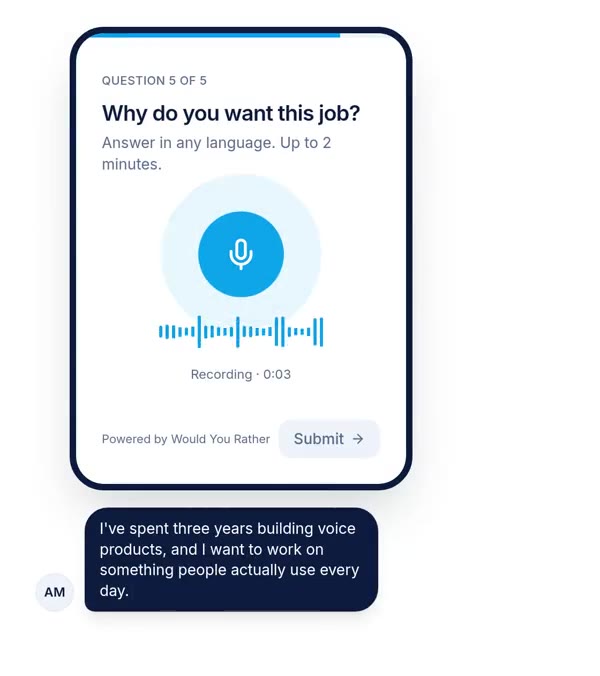
A form that listens asks one thing at a time, accepts answers in the respondent's own words, and lets them speak where a typed box would cut their answer short. It keeps structured fields for facts like names and dates, explains why it needs each item, and offers voice as an option beside the keyboard.
Why forms feel like interrogations
An interrogation has three features. One side controls the questions. The other side cannot ask why. And wrong answers are punished, not discussed. Most forms have all three.
None of this is malice. Forms were designed for the people who process them: databases, compliance teams and analysts. The person filling one in is treated as a data source. We think that is the root problem, and better copywriting alone will not fix it.
Rigid fields decide what counts as an answer
A field is a small contract: put exactly this here, in this format. That works for an email address. It fails the moment a real answer does not fit the shape. A name with one word. An address without a postcode. A reason for cancelling that is really three reasons.
Baymard Institute's 2024 benchmark found the average checkout flow ran to 5.1 steps and 11.3 form fields, while most sites need only 8. Every extra field is one more contract the person must satisfy before they get what they came for.
Validation errors are told-offs
When a form rejects an answer, it rarely explains itself. Baymard found that 98% of sites use generic error messages, the kind that say a field is invalid without saying why. Its testers sometimes became completely stuck, and took up to five minutes to resolve simple sign-in errors.
Timing makes it worse. Baymard reports that 31% of sites have no inline validation at all, so errors arrive only after submit. Some sites go the other way and flag a field as wrong while the person is still typing. One of Baymard's test participants put it plainly: "Why are you telling me my email address is wrong, I haven't had a chance to fill it all out yet!"
Typing on a phone is the slowest part
Many forms are filled in on phones, and a thumb on glass is a slow way to say anything. Ruan and colleagues at Stanford and the University of Washington measured text entry on an iPhone in a lab. Speech entry reached 153 words per minute in English, against 52 for the keyboard.
- Keyboard
- Speech
Speech also made fewer errors during entry in that study, 5.30% corrected error rate against 11.22% for the keyboard. It left slightly more errors in the final text, 1.30% against 0.79%. Speed and accuracy pull in different directions, which matters for fields where precision is everything.
The interrogation has a measurable cost
People do not complain about forms. They leave them. Baymard's abandonment research is the best public evidence of this, even though it comes from shopping, not surveys.
Baymard reports that 17% of US online shoppers have abandoned an order because checkout was too long or complicated. Those are people who already wanted to buy. They were defeated by the form, not the product.
Surveys and applications rarely track abandonment this carefully. Open questions are where the cost is easiest to see, because the answer box can sit there empty. We wrote about that pattern in why the "Any other comments?" box stays empty, and about which question types drive people away in form drop-off by question type.
| An interrogating form | A form that listens |
|---|---|
| Shows every question at once | Asks one thing at a time |
| Asks for everything, just in case | Asks only what it will use, and says why |
| Rejects answers that do not fit the box | Accepts free answers where the shape is unknown |
| Says "invalid input" | Says what is wrong and how to fix it |
| Makes every open answer a typing task | Offers voice beside the text box |
| Asks every question of everyone | Skips what no longer applies |
| Gives clean, comparable data for every field | Gives richer open answers that take longer to analyse |
That last row is a real concession. Interrogation exists because it produces tidy data. A listening form gives up some tidiness to get truth, and you should decide where that trade is worth it.
What changes when a form listens
Listening is not a feature. It is a stance the whole form takes toward the person answering. Voice is the most visible part, so start with the evidence for it.
People say more when they can speak
In 2024, Jan Karem Höhne, Konstantin Gavras and Joshua Claassen published a randomised experiment in Social Science Computer Review. 1,001 German smartphone respondents answered four open questions, half by typing and half by speaking. Spoken answers averaged 54.7 words against 21.5 typed, and mentioned more distinct topics, 3.2 against 1.9.
The authors suggest typing invites careful word selection, which shortens answers. Speaking is closer to conversation, so people narrate instead of compress. We cover the full experiment in our breakdown of voice survey answer length and drop-off.
The respondent hears a person, not a database
Listening runs both ways. A question recorded in the asker's own voice tells the respondent someone real wants the answer. That is a small change with an outsized effect on how a form feels, and it costs the creator one short recording.
We have no controlled study showing a recorded question raises completion, so treat this as our belief, not a finding. It is the kind of belief worth testing cheaply on your next form.
Seven principles for a form that listens
These are the rules we build Would You Rather around. They work in any form tool, and most do not need voice at all.
1. Ask one thing at a time. A wall of fields is a wall. One question per screen lets the person focus, and it hides the length of what is still to come. The UK government's service manual on form structure gives the same advice: start by splitting a form across pages with one thing on each.
2. Every question must earn its place. GOV.UK calls this a question protocol: only add a question if you know why you need the answer, for example because the service cannot be delivered without it. We would go further. If a question exists "in case it is useful later", delete it today.
3. Explain why you are asking. "Phone number (we only call if your delivery fails)" is a different question from "Phone number". One sentence of reason turns a demand into a request.
4. Let people answer in their own words. Use choices for facts with a known shape. For anything about reasons, feelings or stories, give an open answer and accept what comes back. Never force someone to pick the "closest" option when none of them is true.
5. Offer voice, never demand it. Put a microphone beside the text box on the questions where reasons matter. Some people will talk; some will type; both get heard. In our builder the "or type your answer" box on a voice field is off by default, and we recommend switching it on for any audience you have not tested.
6. Skip what no longer applies. If someone said they have never used your product, do not ask them to rate it. Branching logic is listening in its plainest form: the form changes because of what the person said. See conditional logic for forms.
7. Fail gently. Validate when the person leaves a field, not while they type. Say exactly what is wrong and how to fix it. Keep what they already entered. An error message should sound like a colleague pointing at a typo, not a guard refusing entry.
Here is how those principles become a form, step by step.
- 1List every question and what you will do with each answerDelete any question whose answer changes nothing. This is the question protocol.
- 2Split the rest into facts and reasonsFacts (name, date, plan) stay as structured fields. Reasons (why, how, what happened) become open questions.
- 3Pick the one reason question that matters mostMake it a story prompt, and offer a voice answer beside a text box, with a stated time limit.
- 4Order from easy to hardTaps and short answers first, the open question last, when the person has already invested a little.
- 5Add branching so nobody sees an irrelevant questionUse earlier answers to skip whole sections.
- 6Rewrite every error and every label in plain wordsSay why you ask, what format you need, and what went wrong if it did.
If you would rather describe the form out loud and get a first draft, our AI form generator picks field types from a spoken or typed description, and you edit from there.
What a listening form is not
We want to be precise, because "forms that listen" can be stretched into marketing nonsense. Three things it is not.
It is not a chatbot pretending to be a person. A chat interface that types "Great answer!" after every reply is a costume on the same interrogation. We think fake warmth is worse than honest structure.
It is not automatic analysis. Would You Rather stores recordings and links them in your results and spreadsheet. It does not transcribe answers, score sentiment or summarise them. Listening to the respondent still means a human listening, or a transcription step you choose.
It is not an excuse to collect more. A form that listens should ask less, not more. Voice makes long answers easy, which means a lazy question can now produce three minutes of noise. One great spoken question beats five mediocre ones.
Where this argument is weakest
We have argued for listening. Here is the best case against it, made as fairly as we can.
Voice-only forms lose people
The same experiment that showed longer spoken answers also showed far more drop-off. About 51% of people assigned to voice broke off, against about 24% for text. Among those who stayed, roughly 35% of voice respondents skipped a given open question, against under 2% for text.
If the people who refuse to speak are systematically different, older, more private or simply at work, then a voice-only form does not just collect less. It biases what you hear. That is the strongest objection to everything above, and it is why we never recommend voice-only questions for a cold audience.
Some people prefer to write
Writing gives time to think, edit and choose words. For some people, and for some sensitive topics, that is exactly what they want. A deaf respondent or someone with a speech disability may not be able to use voice at all. A text option is not a fallback for them; it is the main route.
Interrogation produces clean data
Structured fields are easy to count, filter and compare. Open answers, spoken or typed, take real time to read or hear. For a form whose job is pure processing, a tax return or a delivery address, interrogation is the right design. Listening belongs where you need understanding, not where you need a postcode.
The evidence comes from other contexts
Baymard's figures describe e-commerce checkouts, not surveys or applications. The speed study used set phrases in a lab. The voice experiment used a paid German panel answering sensitive political questions. Each supports part of the argument; none tests a listening form end to end. We have not run that test either.
Start with one question that listens
You do not need to rebuild your forms. Pick the one where the answers matter most, a customer feedback form, a job application or a course intake. Run the question protocol on it and delete what you do not use.
Then take the most important open question, rewrite it as a story prompt, and offer voice beside the text box. Compare how many people answered it and how much they said against the last version. For the typed side of that comparison, see why typed open answers come out short. If the answers got longer and the response count held, your form just started listening.
References
- Baymard Institute, Scott, E., Checkout Optimization: 5 Ways to Minimize Form Fields in Checkout, 26 June 2024. Used for average checkout steps and form fields, and the 8-field benchmark.
- Baymard Institute, Scott, E., Adaptive Validation Error Messages, 14 December 2023. Used for the share of sites with generic error messages and the time testers spent on errors.
- Baymard Institute, Scott, E., Usability Testing of Inline Form Validation, 9 January 2024. Used for the share of sites with no inline validation and the premature validation quote.
- Baymard Institute, Cart Abandonment Rate Statistics, last updated 22 September 2025. Used for the share of US shoppers who abandoned because checkout was too long or complicated.
- Ruan, S., Wobbrock, J. O., Liou, K., Ng, A. and Landay, J. A., Speech Is 3x Faster than Typing for English and Mandarin Text Entry on Mobile Devices, arXiv, 2016. Used for speech vs keyboard speed and error rates.
- Höhne, J. K., Gavras, K. and Claassen, J., Typing or Speaking? Comparing Text and Voice Answers to Open Questions on Sensitive Topics in Smartphone Surveys, Social Science Computer Review, 2024. Used for answer length, topics, break-off and item non-response.
- UK Government Digital Service, Structuring forms, Service Manual, last updated 7 August 2018. Used for "one thing per page" and the question protocol.
The weakest point in this source base: the form usability figures come from one commercial research firm's e-commerce benchmark, whose sample sizes are not stated on the pages we could open, and the voice evidence rests mainly on one German experiment.
Questions people ask
Why do online forms feel like interrogations?
Because the form controls every part of the exchange. It decides the questions, the order and the format of each answer, and it rejects anything that does not fit, often with a vague error. The person filling it in cannot ask why a question exists or explain an answer that does not fit a box. Long, rigid forms on small phone keyboards make that imbalance feel worse.
What is a form that listens?
A form that listens lets people answer open questions in their own words and, where it helps, out loud. It asks one thing at a time, accepts messy human answers instead of rejecting them, explains why it needs each piece of information, and skips questions that no longer apply. The goal is a form that feels closer to a conversation than a checkpoint, without losing structured data where you need it.
Are voice forms better than typed forms?
For open questions, spoken answers are longer and cover more ground: one randomised experiment found 54.7 words spoken against 21.5 typed. For names, emails, dates and choices, typing or tapping is faster and cleaner. Voice-only forms also lose more people. The best design mixes both: structured fields for facts, and an optional voice answer beside a text box for the questions where reasons matter.
How many fields should a form have?
As few as the job needs. Baymard Institute's research found the average checkout in 2024 had 11.3 form fields and argues most sites need only 8 in total for checkout. Outside e-commerce the same rule applies: for each question, ask what you will do with the answer. If nothing changes based on it, cut it. GOV.UK calls this a question protocol.
Why do people abandon online forms?
Common causes are length, confusing or vague error messages, being asked for information they do not have, and typing effort on phones. Baymard reports that 17% of US online shoppers have abandoned an order because checkout was too long or complicated. Open questions add their own drop-off, since writing a thoughtful answer on a phone keyboard is slow, which is why many people leave those boxes empty.
Do voice answers get transcribed automatically?
It depends on the tool. Some voice form tools transcribe answers; Would You Rather currently does not. It stores each recording next to the respondent's other answers and can send audio links to a spreadsheet. If you need text, export the links and run them through a speech recognition engine, then spot-check by ear before quoting anything, especially for accents and mixed languages.
Drafted with AI from published research, then edited and approved by Apoorv Tamrkar.
Would you rather hear the answer?
Make a voice form in a minute. It’s free.
Create a form