Field Research Forms: Interviews Without Pen and Paper, and When to Use Our Rivals
Only 39% of Indian women use mobile internet, so field forms must work offline or with an enumerator. KoBo, ODK, SurveyCTO, Google Forms and WYR compared.
The short version
- Connectivity, not form design, decides the tool: in GSMA's 2024 survey only 39% of Indian women and 58% of Indian men used mobile internet, so field teams often work where a web form cannot load.
- For offline enumeration, KoBoToolbox and ODK are the better choice. Both queue submissions on the device and sync later; KoBoToolbox is free for nonprofits up to 5,000 submissions a month, and ODK Central is free to self-host.
- SurveyCTO adds audio audits and paid support, from $225 a month on an annual plan; Google Forms has no offline mode for respondents and no audio question type.
- Would You Rather is browser-based and needs a signal to load and upload. It has no offline queue. Use it where respondents have their own smartphones and you want long spoken answers, not for door-to-door work in dead zones.
If your enumerators will spend days outside mobile coverage, don't use our product for the interviews. Use KoBoToolbox or ODK. In GSMA's latest survey, only 39% of Indian women used mobile internet at all, and field research forms have to work where that signal ends.
A field survey app is judged on the worst village in your sample, not the best one. That one fact settles most tool choices. Below we compare five field survey apps on their own published facts, then show where a browser-based voice form still earns a place in the workflow.
For field interviews without pen and paper, put the form on a phone app that works offline: KoBoToolbox or ODK for most teams, SurveyCTO if you need paid support and audio audits. Enumerators fill it with no signal and sync later. Browser-only forms, including Google Forms and Would You Rather, need a connection to load and submit.
Connectivity decides the tool before features do
Most comparisons of mobile data collection tools start with question types. We think that is the wrong end. The first question is whether the phone in your enumerator's hand will have a signal at the moment of the interview, and whether the respondent's phone has one at all.
GSMA's data on India shows how steep the drop is. 71% of Indian women own a mobile phone, but only 39% own an internet-enabled one. Its survey follows people from owning a phone to using the internet every day. At each stage, more women fall away than men.
Two field designs follow from this. If enumerators carry the device, the respondent's phone does not matter, but the enumerator's connection does. If respondents answer on their own phones, you only reach the people at the bottom of that funnel. Pick the design first, then the tool.
We cover the reading side of the same problem in survey methods for low-literacy respondents. The short version: literacy and connectivity gaps overlap, and both point towards an enumerator for first contact.
Five field data tools, on their own published facts
Every figure below comes from the vendor's own pricing or help pages, opened on 8 October 2026. Prices change, so check before you budget.
| KoBoToolbox | ODK | SurveyCTO | Google Forms | Would You Rather | |
|---|---|---|---|---|---|
| Works with no signal | Yes: KoboCollect app or cached web forms | Yes: Collect app or web app, syncs on reconnect | Yes, with advanced offline on higher plans | No offline mode for respondents | No. Needs a connection to load and upload |
| Audio capture | Audio question records or uploads | Audio question; recorder keeps going with the screen locked | Audio field; audio audits in SurveyCTO Collect | No audio question type | Spoken answers are the core field |
| Automatic transcription | 10 min a month on Community | Not listed on pricing page | AI token allowance on every paid plan | No | No |
| Entry cost (Oct 2026) | Free for nonprofits; from $25 a month otherwise | Free to self-host; ODK Cloud from $199 a month | From $225 a month, annual plan | Free with a Google account | Free to start |
| Best for | Nonprofit household surveys | Teams that want their own server | Large studies needing support and audits | Quick internal forms with good signal | Long spoken answers from people with smartphones |
| Where it beats Would You Rather | Offline enumeration, transcription | Offline, self-hosting, data ownership | Offline, audits, paid support | Familiarity, zero setup |
KoBoToolbox
KoBoToolbox's pricing page lists a free Community plan for nonprofits, government agencies, UN organisations and educational institutions. It covers 5,000 submissions a month, 1 GB of file storage and 10 minutes a month of automatic speech-to-text transcription. Private companies and personal use go on paid plans, starting at $25 a month on the Starter tier.
Offline is the point. The page says you can collect data online and offline with the KoboCollect app or with web forms on all devices. Its web form help page adds two caveats worth printing for every enumerator: open the form while connected and wait for it to cache, and never clear browser data mid-fieldwork, because that can delete queued submissions.
ODK
ODK is the open-source project much of this category grew from. ODK's documentation says you can self-host its server, Central, for free if you are comfortable with Linux server administration, and asks you to budget for infrastructure and maintenance. The managed version, ODK Cloud, lists a Standard plan at $199 a month on the pricing page, with 10,000 monthly submissions and one active project.
ODK's audio handling is the most field-ready we found. Its question type docs say the built-in recorder in ODK Collect keeps recording if the user switches apps or locks the screen. That matters when an interviewer records a 40-minute conversation on a phone in a shirt pocket.
SurveyCTO
SurveyCTO's pricing page lists a Basic plan at $225 a month on an annual subscription, or $250 billed monthly, with 10 GB of storage and 5,000 monthly submissions. Higher plans add advanced offline features and larger AI transcription allowances. There is a 15-day trial limited to 200 submissions, and a free community subscription for testing and training.
Its distinctive feature for field quality is the audio audit. SurveyCTO says audio audits capture recordings for surveys run in SurveyCTO Collect, so a supervisor can check that questions were read as written. If enumerator fabrication is a live risk in your study, we would pay for that.
Google Forms
Google Forms is free and familiar, and for that reason it shows up in fieldwork it was never built for. Google's list of question types has no audio question, and a file upload question requires responders to sign in to a Google Account. Google's help page on working offline covers Docs, Sheets and Slides, not Forms. We go deeper in whether Google Forms can record audio.
Would You Rather
Would You Rather is our product, so read this with that in mind. It is a browser form, shown one question at a time, with a voice answer field at its centre. Respondents open a link or scan a QR code, tap the microphone and speak. Recordings land in your results and can sync to Google Sheets with audio links.
It does not work offline. The form needs a connection to load, and each recording uploads as soon as it is captured. If the signal drops, the form retries a few times, keeps the answers on the page and asks the person to tap again once they are back in coverage. There is no offline queue, and closing the tab before an upload succeeds loses that take. It also does not transcribe.
What "offline" actually means in a form app
Vendors use the word loosely, so test it before you rely on it. In practice, offline support has three separate parts, and a tool can have one without the others.
Loading the form without a signal
An Android app such as ODK Collect or KoboCollect downloads the form once and keeps it. A web form has to be cached by the browser, which KoBoToolbox says can take up to 30 seconds on first load. A plain web page, like a Google Form or a Would You Rather form, needs the network every time you open it.
Saving answers on the device
Offline-first apps store each finished submission on the phone. Would You Rather saves typed answers to the browser as the respondent goes and to the server after each question, so a respondent can resume where they left off. That helps with a flaky signal. It does not help in a village with no signal at all.
Sending later, safely
The last part is the queue: submissions waiting on the device, sent automatically when the phone reconnects. This is where data gets lost in real fieldwork, usually from a cleared browser or a phone reset. Before your first field day, fill 3 test forms in airplane mode, reconnect, and confirm all 3 arrive.
Recording the interview, not just the answers
A tick box records what the enumerator heard. A recording keeps what the respondent said. For qualitative field research, that difference is the study.
Four of the five tools can capture audio in some form, but they mean different things by it. KoBoToolbox and ODK record an answer to a specific question. SurveyCTO's audio audits record the interview for quality control. Would You Rather makes the spoken answer the primary data, with optional per-question time limits and a "type instead" box that is off by default.
We think spoken answers are underused in field research. Enumerators summarise under time pressure, and summaries flatten dialect, hesitation and the second reason behind a first answer. If you have the storage and a team who can listen, record the open questions. We explain how long spoken answers run compared with typed ones in a separate post.
Transcription is the cost that arrives later. KoBoToolbox and SurveyCTO include some automatic transcription on their plans. Would You Rather gives you audio files and links, and you run them through the engine you trust. For Indian languages and mixed-language answers, budget for a native speaker to check a sample by ear either way.
A paperless field workflow, step by step
Here is a workflow that fits most small and medium field studies. It assumes enumerators on Android phones and an offline-first tool for the interview itself.
- 1Draft the questionnaire as a spreadsheet form or in the form builderKoBoToolbox and ODK both support the XLSForm spreadsheet standard, and SurveyCTO also builds forms from spreadsheets, so a well-kept file travels with you if you change tools.
- 2Mark which questions need a recordingKeep demographics and counts as choices. Add an audio question only where you need the respondent's own words, and say so in the consent script.
- 3Install the app and download the form on every phoneDo this at the office on Wi-Fi. Open each form once so it is stored on the device before anyone leaves.
- 4Run an airplane-mode testFill 3 test submissions with no signal, reconnect, and confirm all 3 reach the server with their audio attached.
- 5Sync at a fixed point each dayPick a place with a signal, such as a market town or the field office, and have every enumerator sync there before evening.
- 6Review a sample of recordings within 48 hoursA supervisor listens to 5 to 10 answers per enumerator in the first two days. Problems caught early are cheap to fix.
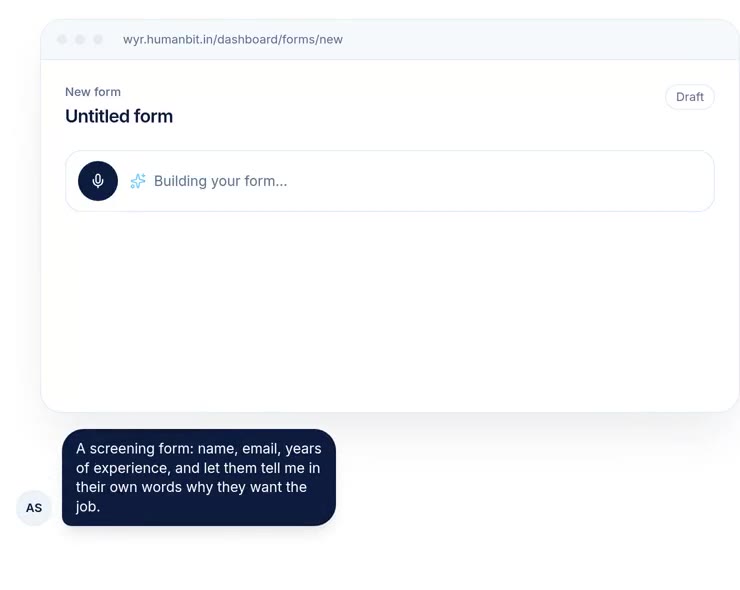
If your team builds forms often, drafting can start from a spoken description. Would You Rather can turn a typed or spoken description into a draft form, choosing field types for you. See how the AI form generator works.
The hybrid we would actually run
Our honest recommendation is a split. Run the household interview on KoBoToolbox or ODK, offline, with an enumerator. Then use a voice web form for the follow-ups where respondents do have a smartphone and a signal.
Follow-ups are where a browser form shines. A respondent can answer a week later, at night, in their own words, without anyone travelling. A QR code on a printed card left after the visit is enough. We cover that pattern in QR code forms for events and field visits. Turn on anonymous answers so nobody has to sign in.
We would not use Would You Rather as the only tool in a study where most respondents lack smartphones. We would use it to hear back from the ones who have them, and to collect longer spoken stories than an enumerator can write down.
Where this comparison is weakest
This post compares published facts, not field performance. We did not run the same survey on all five tools, and we have not measured sync failure rates, battery life or data loss for any of them. Those matter more than any row in the table.
Pricing pages also hide detail. KoBoToolbox's eligibility for the free plan depends on your organisation type. ODK Cloud's page shows a toggle between yearly and monthly billing, and we report the price it displays by default. SurveyCTO's trial limits are small. Check each page on the day you buy.
The connectivity figures are industry research from GSMA, based on its own consumer survey, not official statistics. They are national averages. Your district could be much better or much worse, and a half-day signal walk with a phone will tell you more than any report.
How to choose in one afternoon
Answer three questions in order. Will the interview happen where there is no signal? If yes, choose KoBoToolbox or ODK. Do you need paid support or audio audits for quality control? If yes, look at SurveyCTO.
If the answer to the first question is no, and your respondents can answer on their own phones, a browser form is simpler. Then the question is whether you want typed or spoken answers. For spoken ones, compare dedicated voice survey tools before you commit.
References
- GSMA, The Mobile Gender Gap Report 2025, industry research based on the GSMA Consumer Survey 2024. Used for mobile ownership and internet use in India by stage and sex.
- KoBoToolbox, Pricing and Data collection through web forms, accessed 8 October 2026. Used for plans, limits, transcription minutes and offline caveats.
- ODK, Pricing, Installing Central and Question types, accessed 8 October 2026. Used for ODK Cloud prices, self-hosting and the audio recorder.
- SurveyCTO, Pricing, accessed 8 October 2026, and its features page. Used for plan prices, limits, trial terms and audio audits.
- Google, Choose a type of question for your form, Google Docs Editors Help, accessed 8 October 2026, and Google's help page on working offline in Docs, Sheets and Slides. Used for question types, the file upload sign-in rule and offline scope.
- Would You Rather product code, checked 8 October 2026. Used for how recordings upload, retry and resume, and the absence of offline support and transcription.
The weakest point in this source base: vendor pages describe what each tool is designed to do, not how often it works in the field, and the connectivity figures come from industry research rather than official statistics.
Questions people ask
What is the best app for offline field surveys?
For offline field surveys, KoBoToolbox and ODK are the standard choices. Both let enumerators fill forms with no signal and send submissions when the device reconnects, through an Android app or a cached web form. KoBoToolbox is free for nonprofits on its Community plan. ODK Central is free to self-host, or you can pay for ODK Cloud. SurveyCTO is a paid option with advanced offline case management.
Can Google Forms be used offline?
Not for collecting responses. Google's help page on working offline covers Docs, Sheets and Slides, and does not list Forms. A respondent needs a connection to open and submit a Google Form. You can make the linked response sheet available offline to read past data. For fieldwork without a signal, use an offline-first tool such as KoBoToolbox or ODK.
Can I record audio during a field interview?
Yes, in several tools. KoBoToolbox and ODK both have an audio question that records from the phone's microphone, and ODK's built-in recorder keeps going if the screen locks. SurveyCTO offers audio audits that record parts of an interview for quality checks. Always tell respondents you are recording and get consent, and check local rules on storing voice data.
Is KoBoToolbox free?
For many teams, yes. As of October 2026, KoBoToolbox's pricing page lists a free Community plan for nonprofits, government agencies, UN organisations and educational institutions, with 5,000 submissions a month and 1 GB of file storage. Private companies and personal use fall under paid plans, starting at $25 a month. Paid tiers add submissions, storage and transcription minutes.
What is the difference between ODK and KoBoToolbox?
Both support the XLSForm spreadsheet standard, so one form file can often move between them. ODK is open source; you self-host its server, ODK Central, for free or pay for ODK Cloud. KoBoToolbox is a hosted service with its own form builder and a free plan for nonprofits. Pick KoBoToolbox for zero setup, and ODK when you need your own server or full control.
Do field survey apps work on iPhone?
Partly. ODK's install guide for its Collect app covers Android only, which is one reason many field teams buy Android phones. KoBoToolbox says its web forms work on all devices, including iOS, and support offline collection in widely used browsers. Browser-based tools, Would You Rather included, run on any modern phone browser, but need a connection unless they cache the form for offline use.
Drafted with AI from published research and vendors' own pricing and help pages, then edited and approved by Shivam Singh.
Would you rather hear the answer?
Make a voice form in a minute. It’s free.
Create a form